

The Constructive 2026.9 release is a polish-focused update with less manual effort for admins, and a more accurate, consistent view for your clients. Highlights include bulk hiding of item URLs and a run of fixes that keep progress, documents, and registration behaving exactly as expected.
Occupier Details on the Trade Defect Report:
Trades attending a property now know exactly who to contact for site access. Occupier details have been added to the Trade Defect Report, bringing it in line with the Maintenance Report, which already includes them – shown in the same format and location, and omitted gracefully where no occupier is recorded on the job.
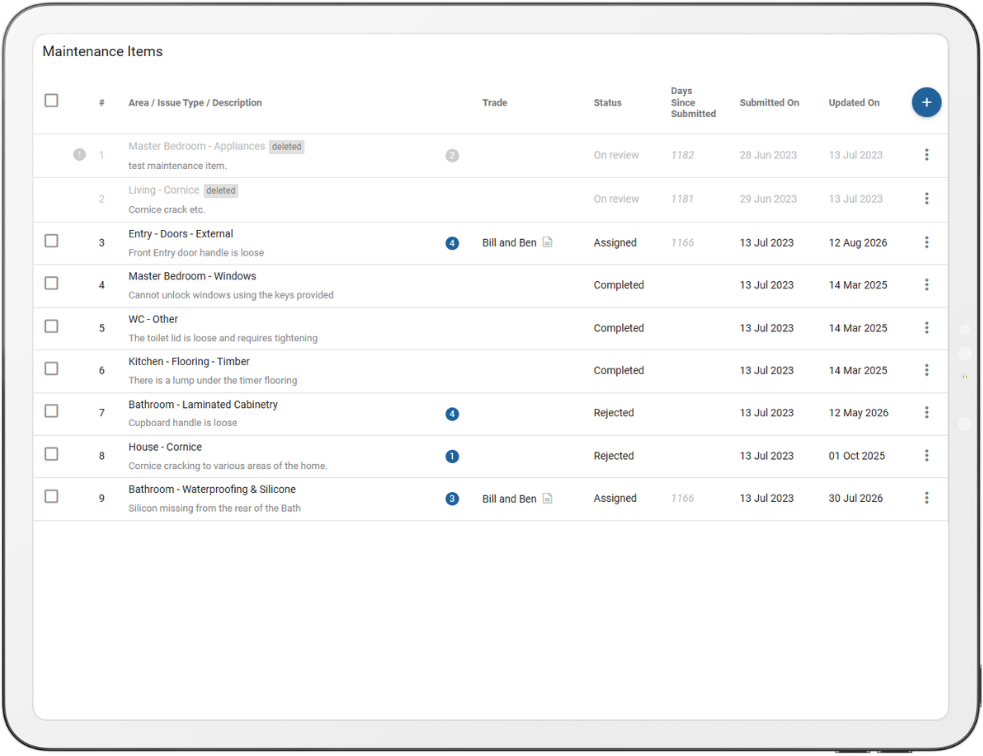
See Which Defect Reports Have Been Sent at a Glance:
Staff can now tell which maintenance items have already had a trade defect report sent without checking each one individually. A new icon on the Maintenance Items screen surfaces that status at a glance, making the most of the limited space on the maintenance tab.
New: Hide Item URLs in Bulk:
Improvements and Refinements:
A number of improvements in this release keep the client-facing view accurate and the admin experience consistent:
- Clients no longer see an old update after a document has been removed, because deleting a document now also removes its associated activity entry.
- Progress stays accurate too – a milestone reverted from Completed back to In Progress now disappears from the client’s Recent Activity banner.
- Registration is cleaner as well: clients registering on an active job are no longer prompted to link to an unrelated cancelled job that happens to share their email address.
- Deleted comments on maintenance items now stay deleted rather than reappearing after a reload.
- Admins get the correct results when changing the selected company while a filter is applied, without needing to reapply it – across Jobs, Messages, Maintenance Items, Todo Items, Progress Communications, Surveys, and the Maintenance Wizard.
- Discontinued-item reminders now send reliably, resolving an intermittent issue that could stop them going out on busy mornings.
- In the 3D model editor, decorations and lighting no longer end up mismatched, because the house’s transformation controls now stay locked until everything has fully loaded.
If you have any questions after reading the full release notes, or want help navigating the new features, our team is here to support you.