
Product Updates

Constructive 2025.9 – Smarter selection customisation, improved reporting flexibility, and smoother job management.

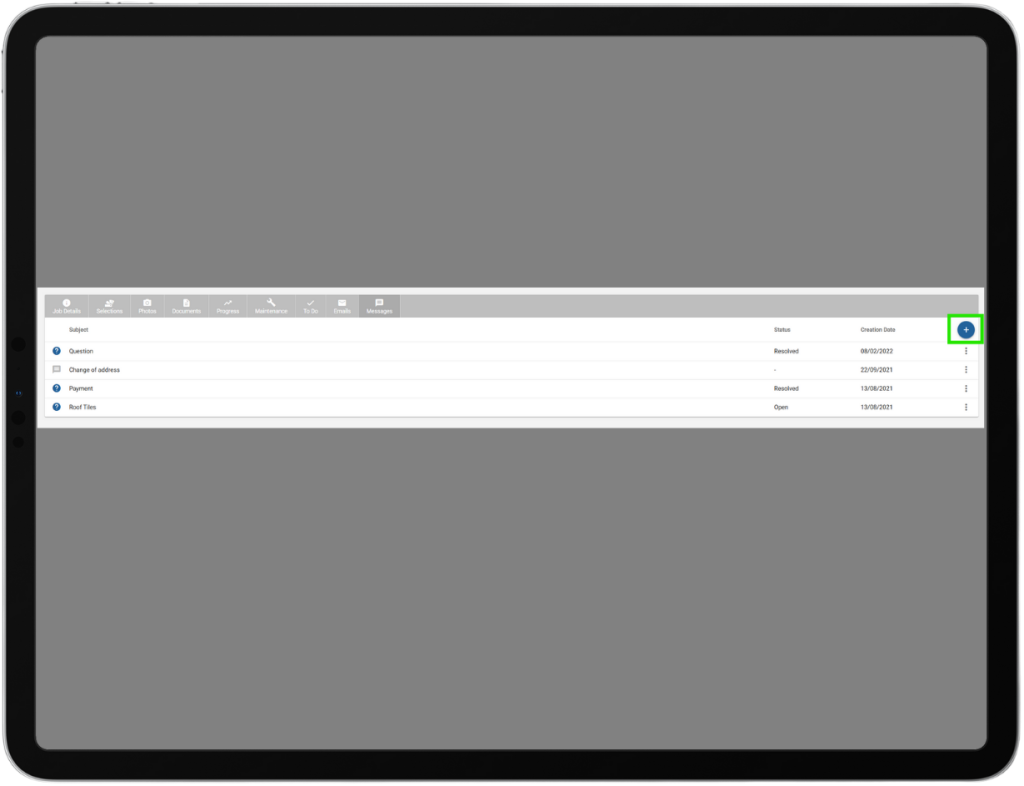
This release introduces a range of enhancements and fixes designed to make selections, reporting, and job management more flexible and user-friendly. Highlights include the ability for selections consultants and builders to easily customise “Other” selection items with bespoke images and labels, improved template and reporting options with new pricing display controls, and streamlined management of To Do templates and progress ordering. Several improvements have been made to search functionality, parent-child job toggling, user interface clarity, and mobile usability. These updates aim to provide a smoother and more efficient experience across the platform, catering to the specific needs of both builders and clients.

JOB Editable “Other” Selection Items:

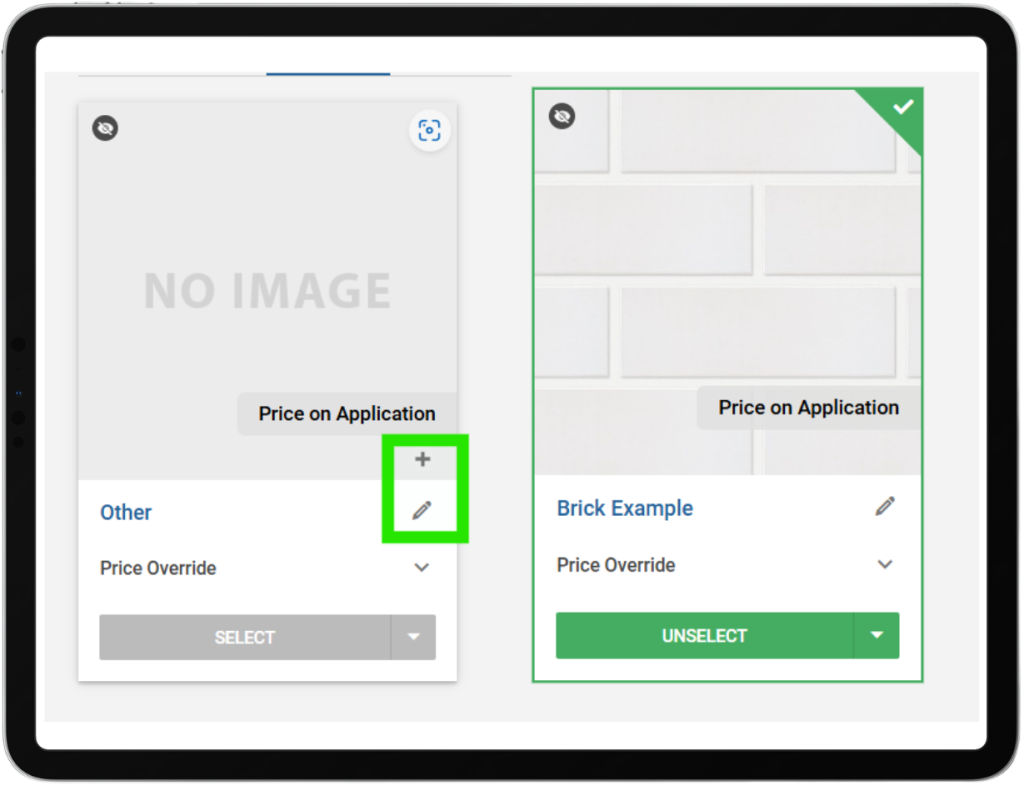
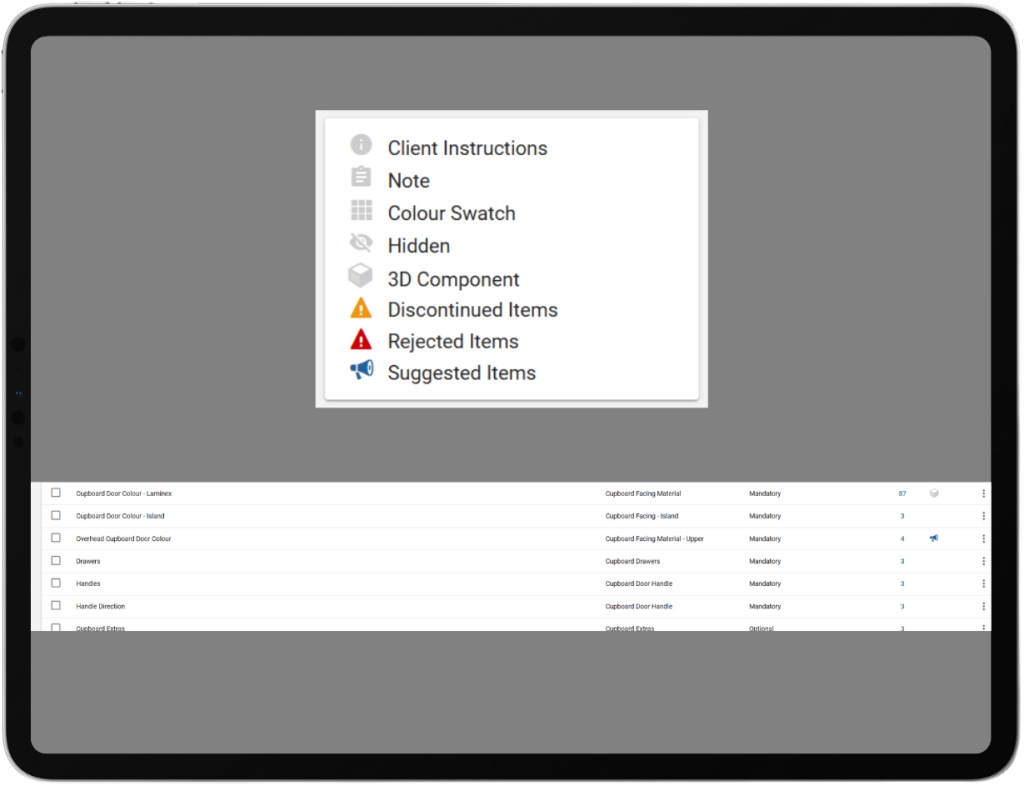
Selections consultants can now customise “Other” choices at the job level by assigning an image directly onto the item and overriding its display name. This allows builders—especially smaller ones without full library coverage—to quickly add bespoke items with their own images and labels. The uploaded image is saved against the job’s selection choice and used throughout the UI and reporting, making job selections more flexible and accurate.  

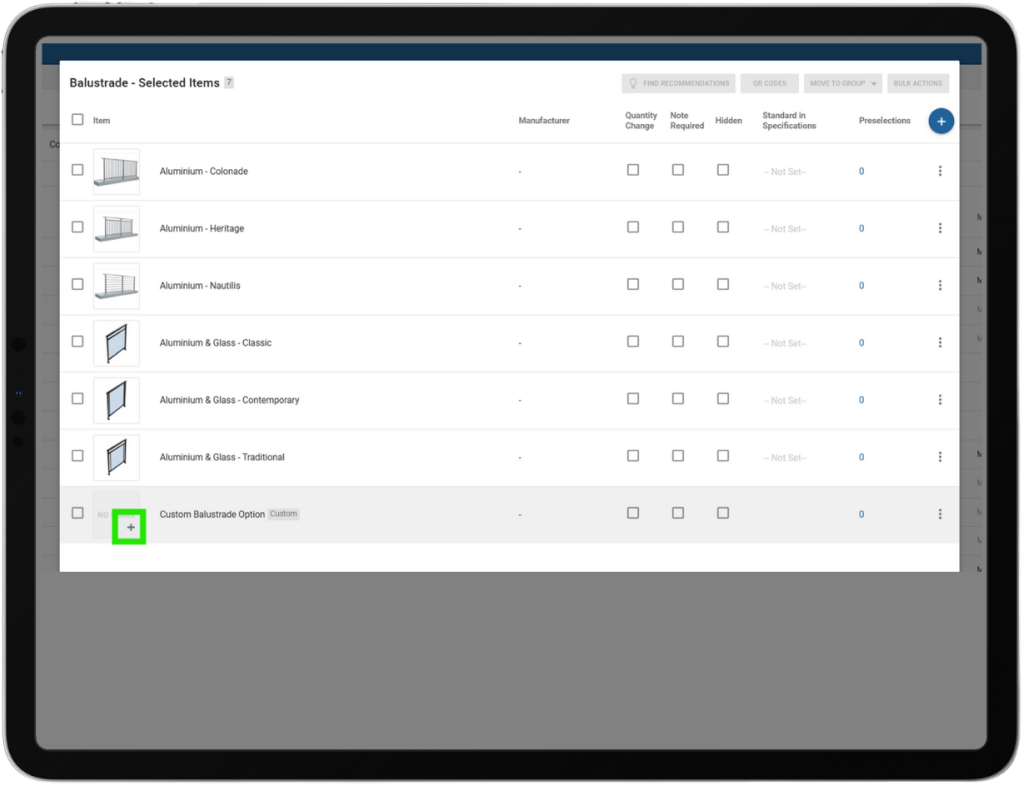
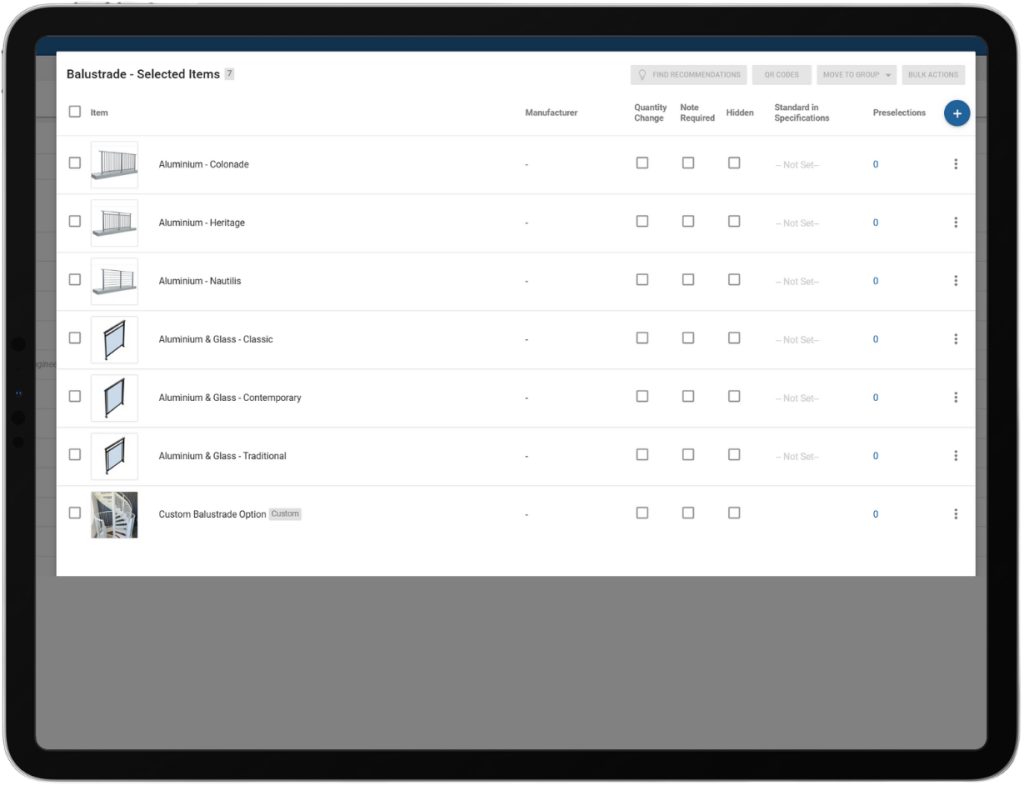
Selections Template – Builder Custom Item – Assign Image:

Builders can assign images to their own custom items directly within their selection templates. This allows builders to include unique options—such as staircases or cabinetry—that are specific to their projects without adding them to the main item library. The uploaded images are automatically processed and linked to the custom item, making it easy to visually represent these options in selections while keeping the item library clean and manageable. Note: Custom items can still not be priced.

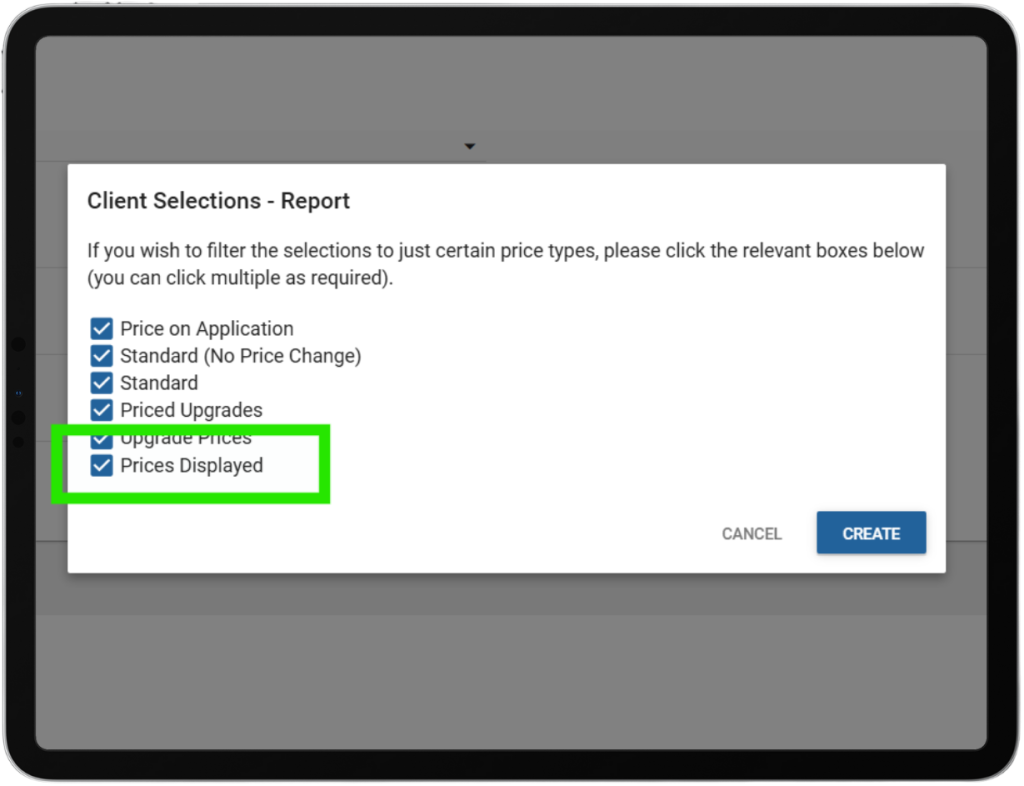
Reports – Addenda – Prices Displayed Option:

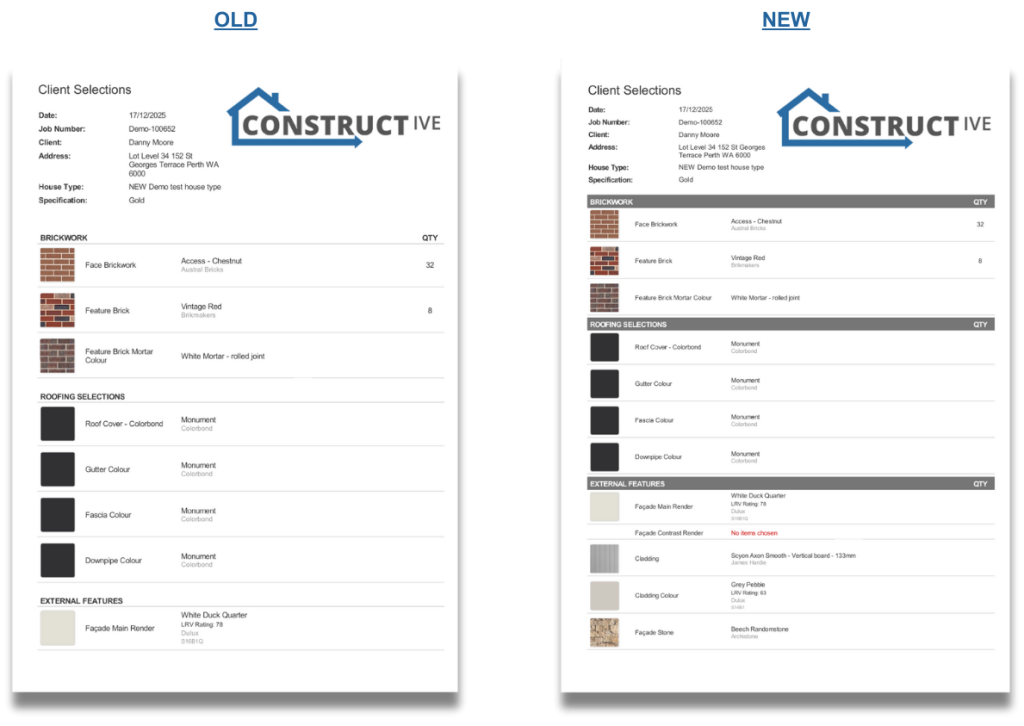
A new “Prices Displayed” checkbox has been added when generating addenda, allowing users to choose whether pricing is included in the document. This removes the need for multiple templates and manual oversight, enabling faster and more flexible addenda creation for internal use, subcontractors, or suppliers, all from a single template.

Prices Embed Report & Intelligence Menu Update:

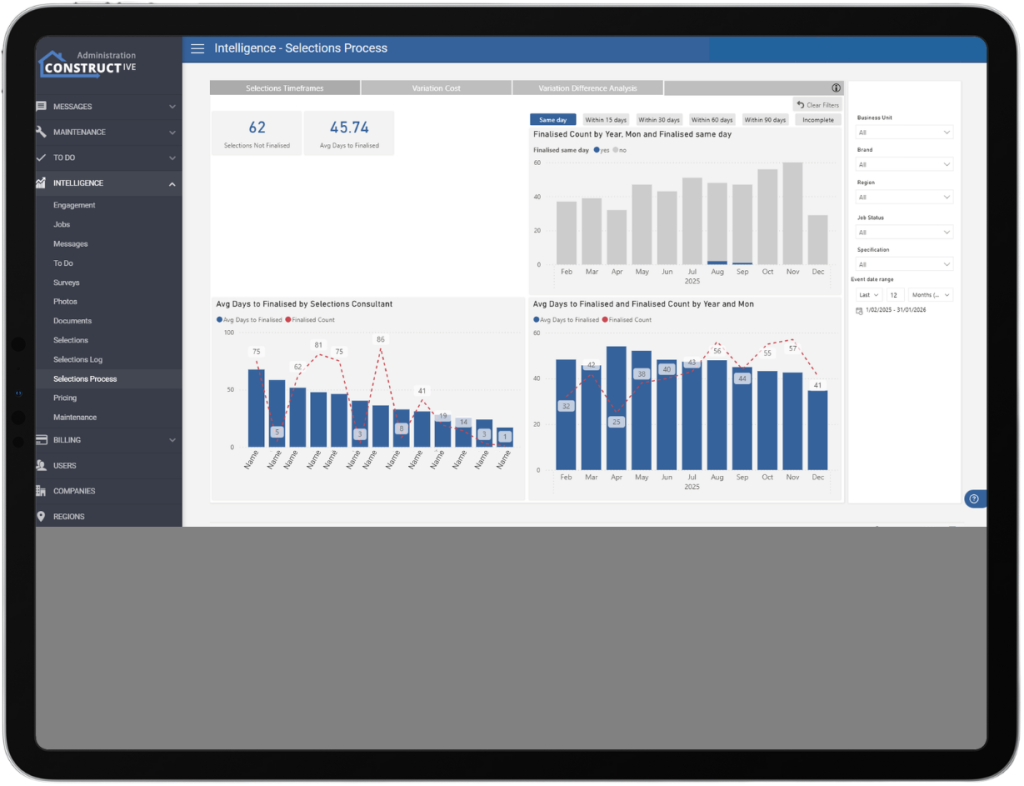
A new Prices report has been added to the Intelligence menu. The menu has also been reordered for improved usability, with the new sequence: Engagement, Jobs, Messages, To Do, Surveys, Photos, Documents, Selections, Selections Log, Pricing, and Maintenance.

To Do Template List – Ordering & Linked Progress Items:

Admins can now organise To Do template items using drag-and-drop ordering, ensuring items appear in the intended sequence rather than alphabetically. This ordering is managed exclusively in Admin and is applied automatically when templates are used in jobs. Linked progress items now display in the same order as defined in the Progress Template, making setup clearer and more intuitive.

To Do – Progress View Ordering:

Fixed an issue where linked progress items in the To Do view appeared in the wrong order; they now display in the same sequence as defined by the Progress Template ranking, ensuring stages like Sales appear in their intended position.

Selections Improvement – Search for Items in Packages:

Users can now search for product codes and item names when adding them to packages within a selection template. This enhanced search functionality aligns with the main selection template, making the process smoother and more consistent.

Jobs Improvement – Parent-Child Job Toggle:

Builders can now seamlessly toggle between parent and child jobs when both jobs are linked. This improved functionality allows users to access and switch between both jobs as expected in parent-child job setups, enhancing workflow efficiency and ease of use.

Package Selection Popup Wording – Updated:

The selection confirmation pop-up has been updated to display clearer, more user-friendly wording. It now reads: “You are making a selection outside of your package. Do you wish to continue?” for any choices, improving clarity for users.

Additional Improvements:

  • Message tab comments now reliably show to clients after 17 comments.
  • 3D decorations, lights, and cameras are correctly reset when using the Clear function, providing a consistent workspace.
  • Mobile users can now smoothly exit the email preview, streamlining navigation and user experience.

If you have any questions after reading the full release notes, or want help navigating the new features, our team is here to support you.
Delivering excellent customer experience

We integrate with workflow systems

“Double-handling of client and construction data is a thing of the past. Constructive Software seamlessly integrates into key data points of BusinessCraft, enabling us to communicate in real-time to our clients: Documents, photos, Milestones and more.”   

Fabio Fusari, IT Manager – Summit Homes.

More about integrations
Featured Post

Constructive 2025.8 – Practical enhancements and fixes designed to streamline platform management and improve user experience.

The Constructive 2025.8 release delivers a range of practical enhancements and fixes designed to streamline platform management and improve user experience. With updates to selections, maintenance notifications, and pricing, this version focuses on usability, visibility, and consistency. Users will benefit from refined features such as simplified pricing options, improved navigation, and more reliable maintenance tools, ensuring smoother and more efficient workflows across the board.

Maintenance Enhancement – [LOCKED] Email Tag.

A new [LOCKED] tag has been introduced for Maintenance emails, usable in both inbound and outbound messages. The tag functions like the existing [URGENT] tag, triggering specific handling for locked requests while ensuring it is removed from the final email content sent to users.

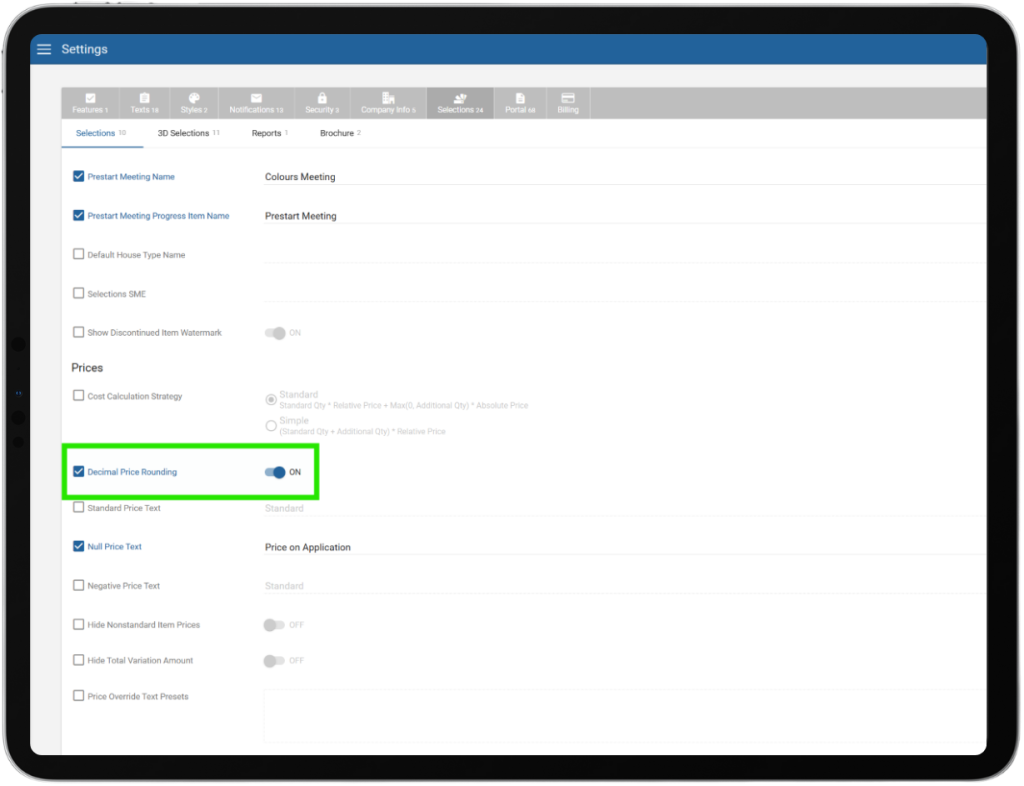
Pricing Enhancement – Round to Nearest Dollar.

A new setting has been added to round final prices to the nearest dollar, ensuring that calculations involving quantities do not result in decimal prices for clients.


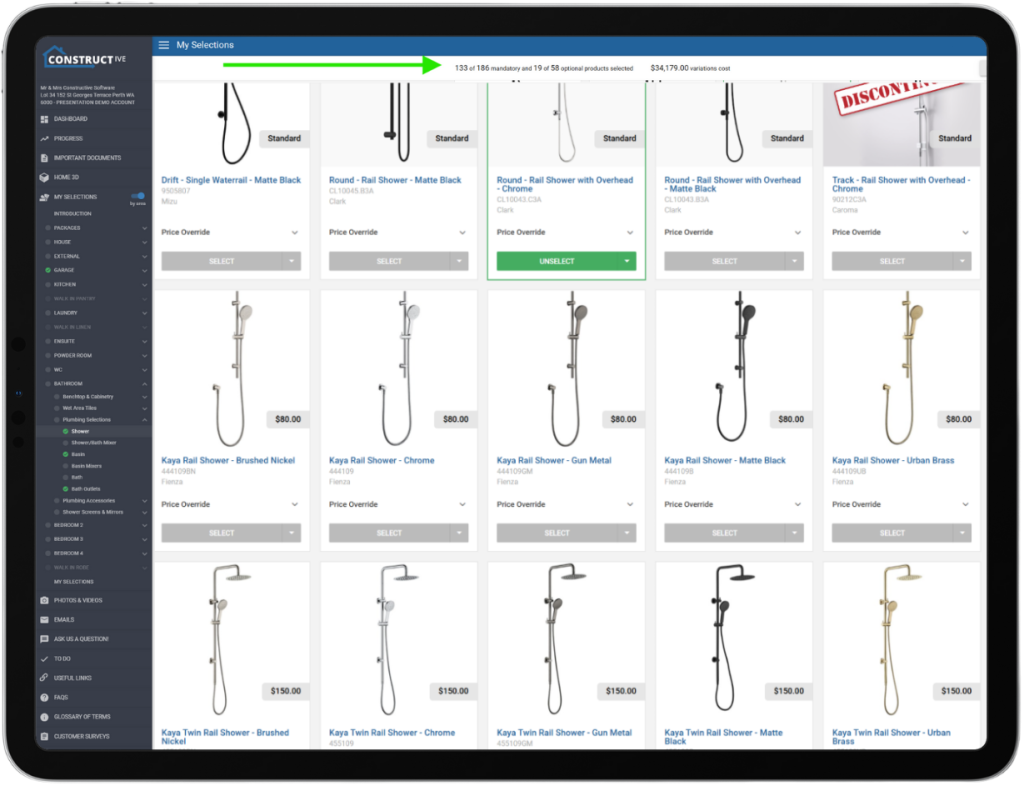
Selections Enhancement – Sticky Variation Header and Navigation Bar.

The Variation total bar and NEXT/BACK buttons on the Selections screen are now sticky, remaining visible while scrolling through long lists of selections. This enhancement improves usability by keeping totals and navigation controls accessible at all times.


If you have any questions after reading the full release notes, or want help navigating the new features, our team is here to support you.

Delivering excellent customer experience

We integrate with workflow systems

“Double-handling of client and construction data is a thing of the past. Constructive Software seamlessly integrates into key data points of BusinessCraft, enabling us to communicate in real-time to our clients: Documents, photos, Milestones and more.”   

Fabio Fusari, IT Manager – Summit Homes.
More about integrations
Featured Post

Constructive Intelligence Analytics Update – October 2025 – Builders Gain Insight into Client Communication Through Real-Time Messaging Data.

Say Goodbye to Email Chaos—Embrace the Power of Tracked Messaging! 

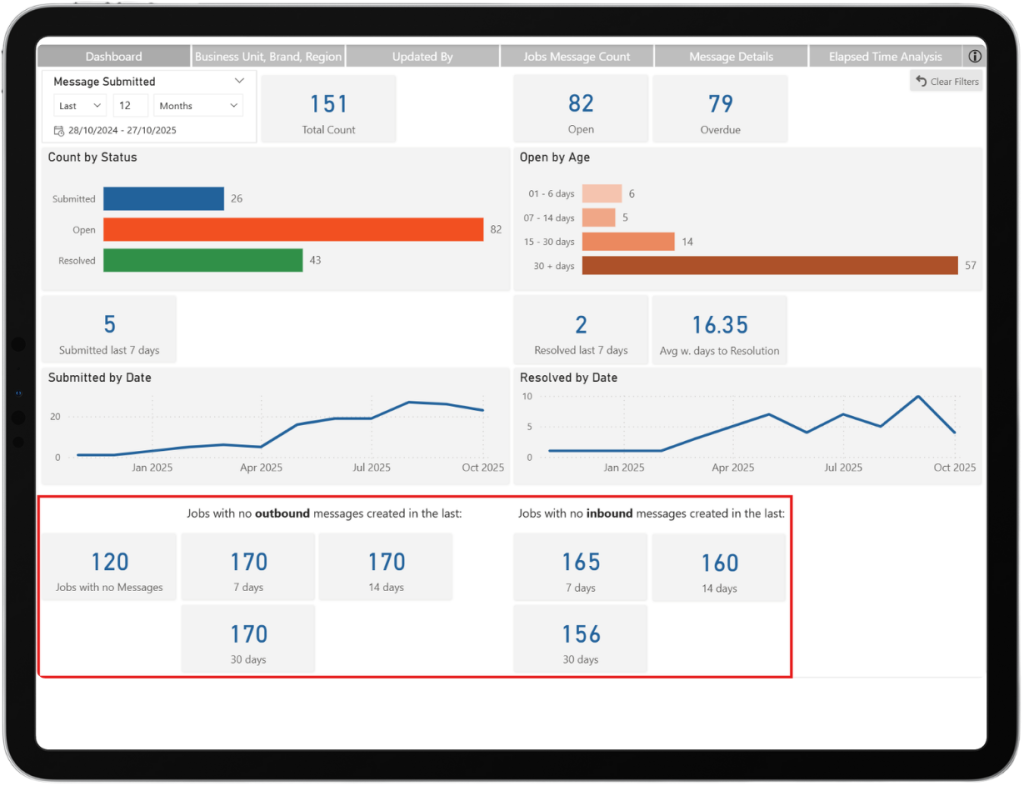
We’re thrilled to bring you an Intelligence Release that is designed to put you back in control of communication, clarity, and client satisfaction. Ever felt weighed down by scattered emails, endless client calls, and complaints like “We have too many queries coming in” or “I can’t keep up”? Well, we heard you. That’s why with Constructive Software, Builders can now remove the anecdotal fiction and see the facts about inbound and outbound communication through the Messages function and reporting. 

When utilising Constructive Messages, Builders will now have a real-time overview of inbound and outbound messages in this new, well-designed, easy-to-read dashboard, available directly within Constructive embedded reports. 

Builders see the truth using these features:

  • Message-Only Client Communication: This is a first step towards ditching the messy email inbox! Move all client interactions into a single, streamlined messaging channel. (Face-to-face and calls are still welcome, of course!)
  • Outbound Message Tracking: Instantly spot which jobs aren’t getting proactive updates. Make sure every client hears from your team—before they ever need to ask.
  • Comms Audit & KPIs: No more he said/she said. Instantly check historic messaging if a client claims they’ve been left in the dark. Use real data to support staff performance reviews and keep your team accountable.
  • Inbound vs Outbound Balance: Get a crystal-clear view of all messages. If inbound queries are outpacing your outbound updates, you’ll know right away—and can fix it fast!
  • Data-Driven Management: For the first time ever, access hard stats on client communication volume, response times, and individual staff activity. No more guesswork. Just facts.

This is not just another tool – it’s your ticket to proactive, transparent, and measurable client service. Put an end to confusion, boost trust, and use these tools to manage your business well.

If you’re not a Customer Portal user, please Contact Us so that we can ensure you enjoy these benefits too.

If you have any questions or want help navigating the reports, our team is here to support you.


Delivering excellent customer experience

We integrate with workflow systems

“Double-handling of client and construction data is a thing of the past. Constructive Software seamlessly integrates into key data points of BusinessCraft, enabling us to communicate in real-time to our clients: Documents, photos, Milestones and more.”   

Fabio Fusari, IT Manager – Summit Homes.

More about integrations

Featured Post

Constructive 2025.7 – A fresh round of improvements designed to make your experience smoother, smarter, and more responsive than ever!

We’re thrilled to announce a fresh round of improvements designed to make your experience smoother, smarter, and more responsive than ever! This update brings practical enhancements that directly address your feedback, delivering better communication and reliability across the platform. Dive in to explore what’s new and see how these changes will boost your workflow and client satisfaction.

Amplified selection template recommendations.

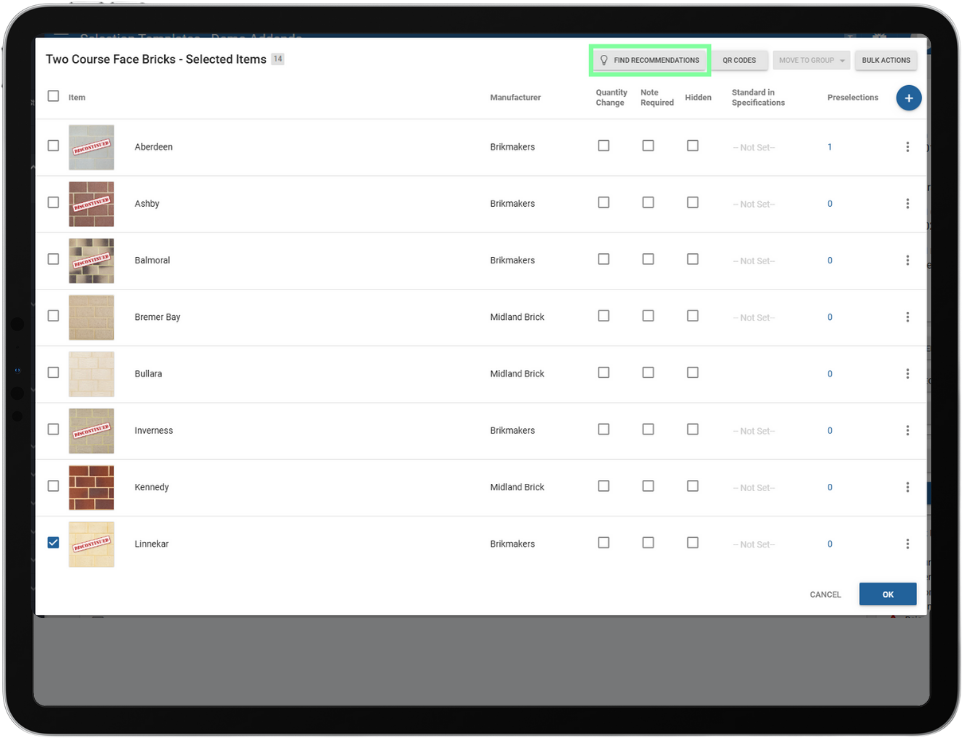
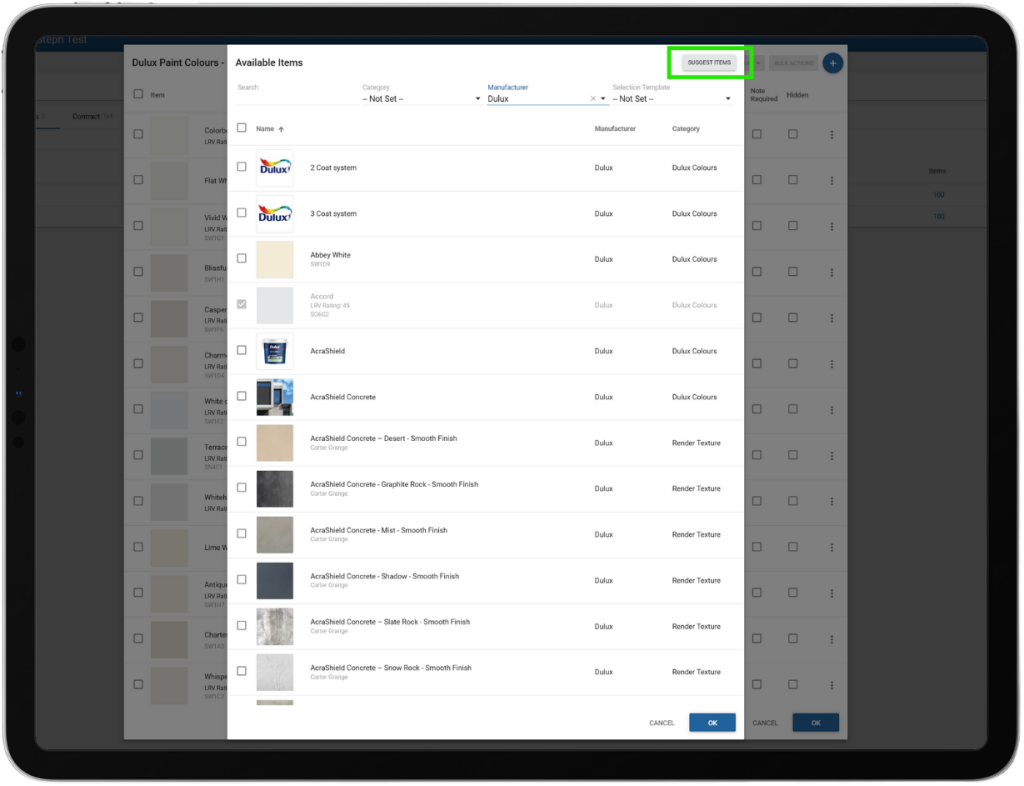
The Find Recommendations feature now suggests relevant choices for Selection Template items. This helps builders create Selection Templates faster by providing compatible and previously unconsidered options, saving time and showcasing Constructive’s expertise in Selections methodology.  

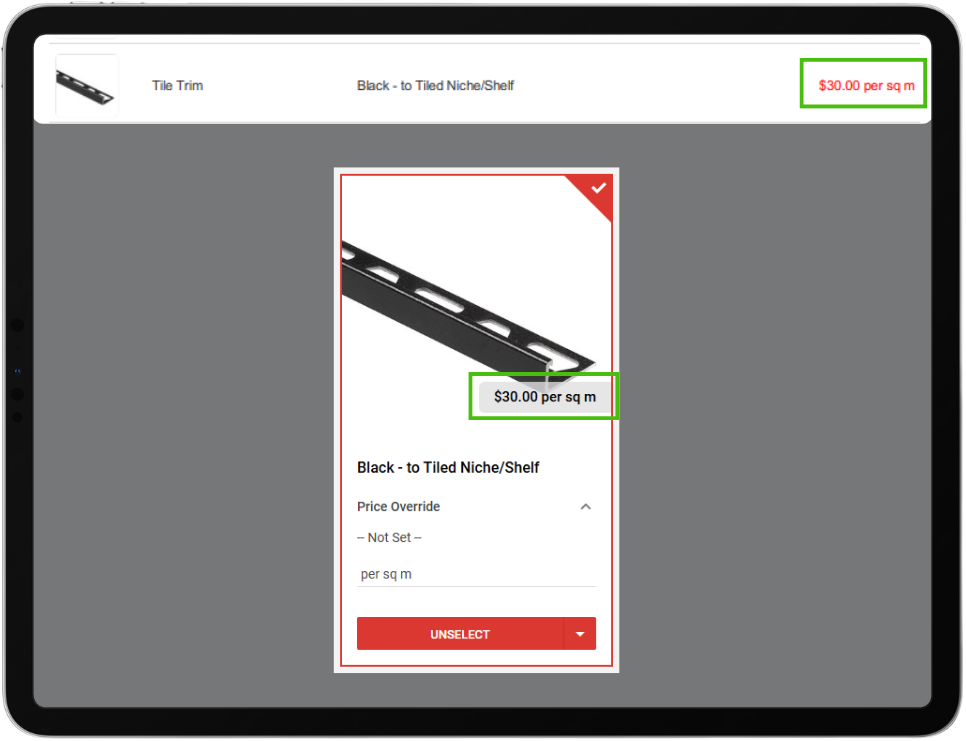
Clearer pricing for enhanced transparency.

The Price Text field will now display after the price value (e.g., 120.00 per sq/m). This allows builders to use the field for contextual indicators, such as per sq/m or per unit, improving clarity in cases where quantities are not editable or not captured on a job.


Streamlined registration notifications for sales representatives.

Sales representatives will now only receive the initial registration email. They will no longer be included in subsequent registration reminder emails by default, reducing unnecessary notifications.

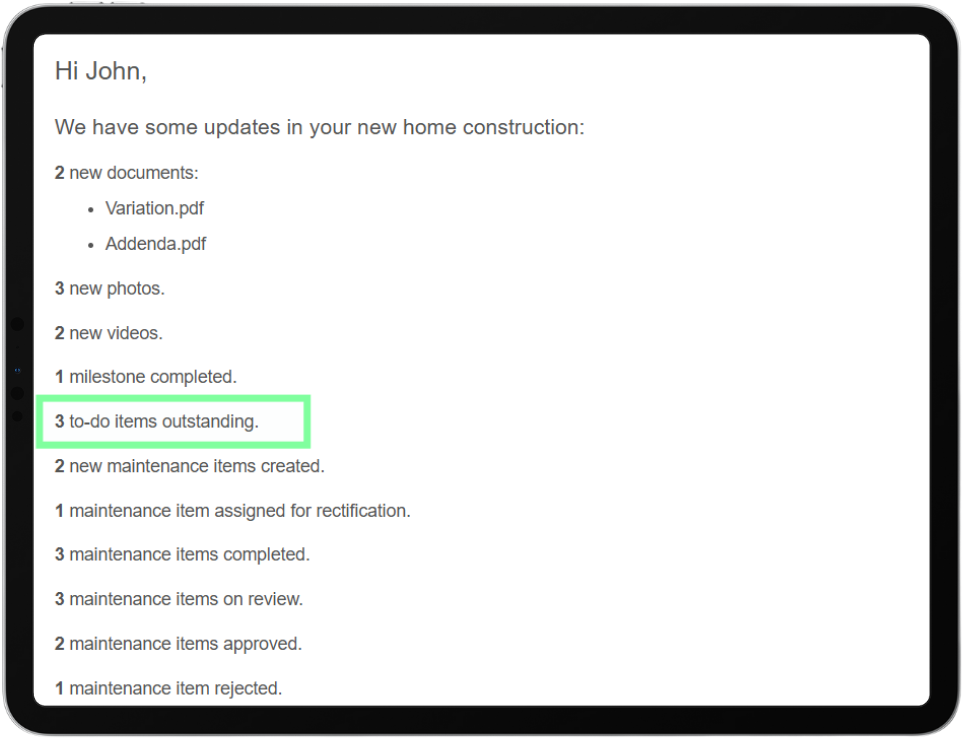
Clients stay organised with To-Do reminders in activity emails.

Activity emails now include a reminder showing the number of uncompleted To-Do tasks remaining on a client’s portal, similar to existing survey reminders.

Centralised custom text box management for better usability.

All instructional custom text locations have been moved to the ‘Texts’ page/tab for improved usability and consistency.

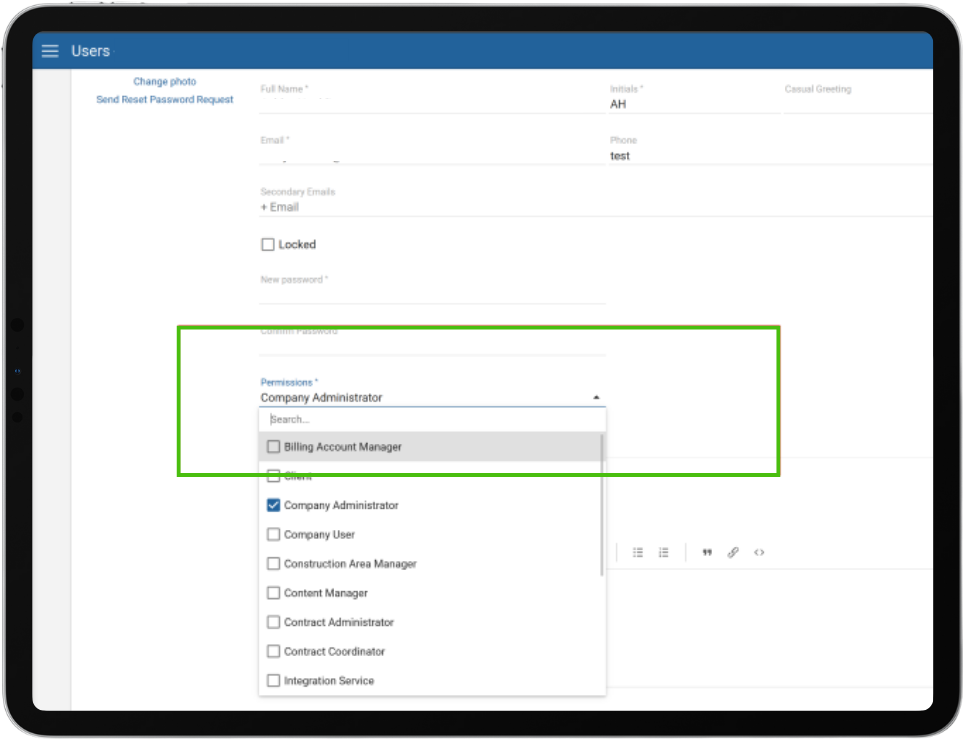
Improved clarity with consistent permission terminology.

All instances of the user field/label “Role” have been updated to “Permission.” This change ensures consistent terminology across the application.

Note: Job Contact Role is a different field and will continue to be referred to as Role. This enhancement clearly separates the concepts of Role (for job contacts) and Permission (for user access), reducing confusion for builders.


Expanded Intelligence report visibility.

Access to Intelligence reports in Constructive has been broadened to include most user permissions, making insights more widely available across teams. Sales Consultants remain excluded from report visibility as per current preferences.

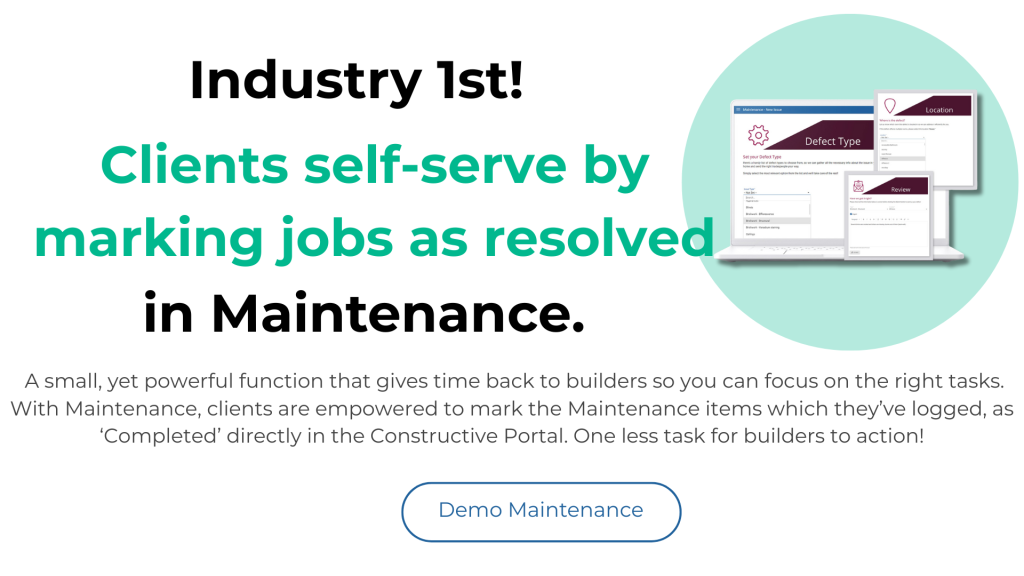
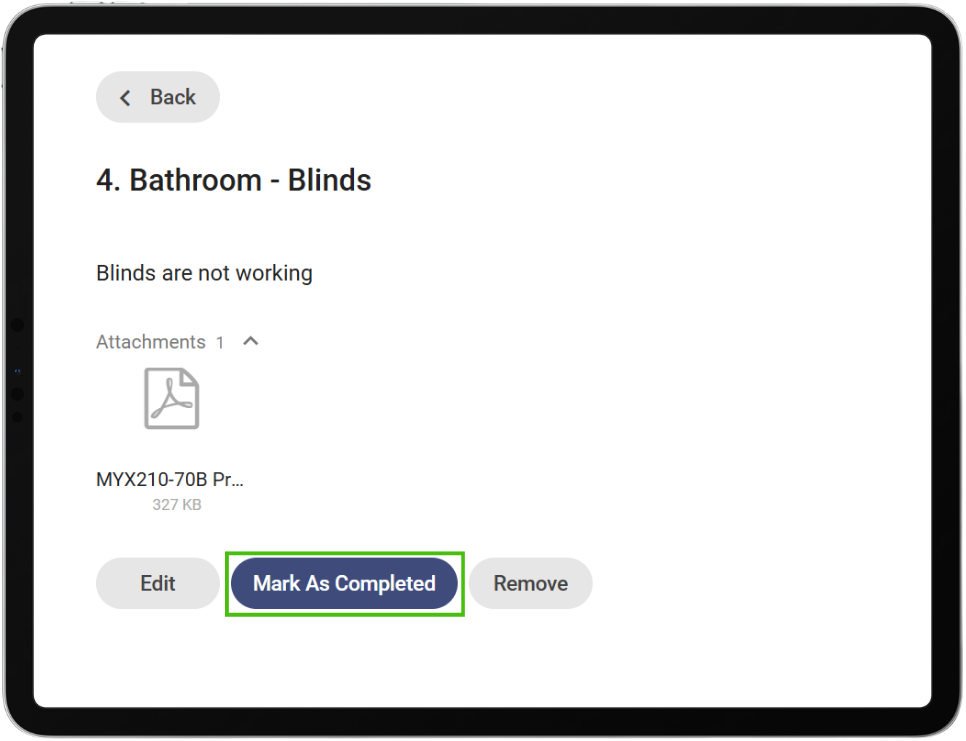
Clients are now empowered to mark Maintenance items as completed, helping builders.

Clients can now mark maintenance issues as completed directly in the Constructive Portal. 


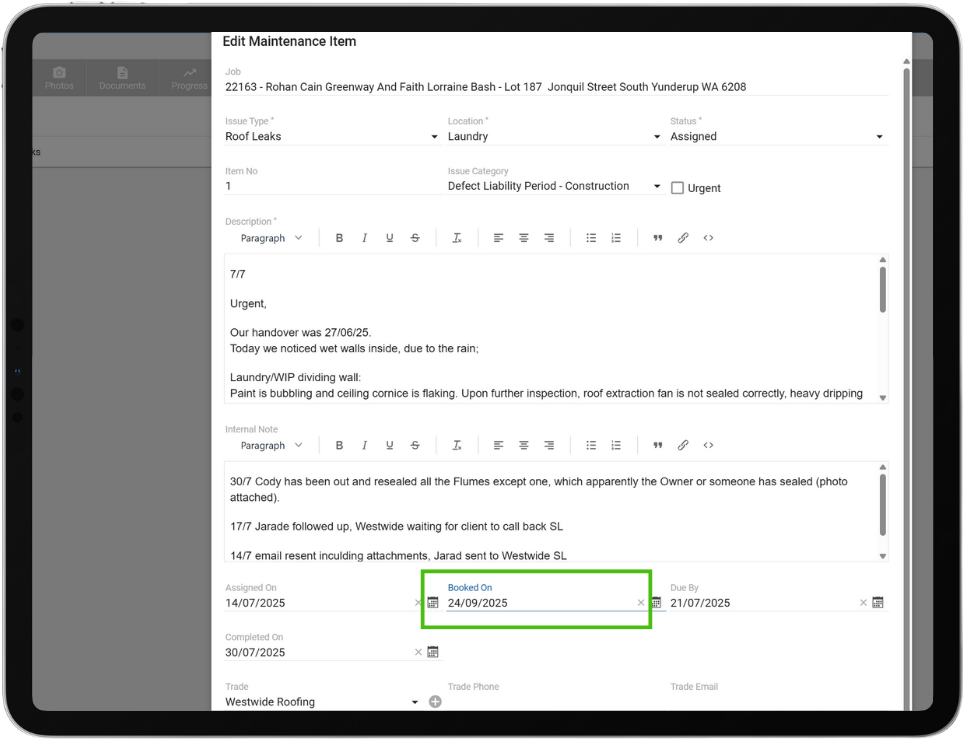
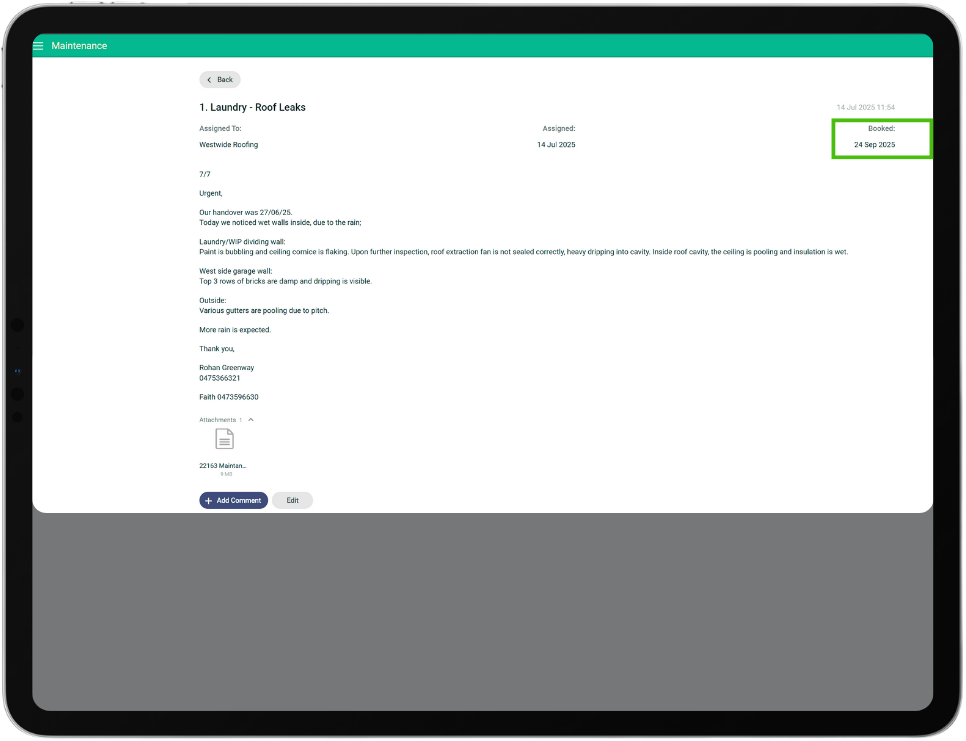
New Maintenance ‘Booked Date’ to improve client transparency while keeping internal deadlines private.

The due date of maintenance items will no longer be displayed to clients. A new field, Booked Date, will be shown to the client if a date is available, providing a clear schedule without exposing internal due dates.


Streamlined user management – Refined client linking to avoid duplicates.

Company Admins can now attach existing users to a job that don’t already have a user record. This allows Builders the ability to assign existing user accounts for their known repeat clients, mitigating an additional registration process for those users.

Timely client updates for after-hours progress.

Progress emails triggered by tasks completed outside business hours will now be sent the following morning, instead of the following evening, reducing delays in client communication.

Construction progress percentage improvement in the client view. 

An issue was resolved where the construction progress in the client view was not updating. Progress now correctly reflects completed construction tasks.

Disabled emails improvement.

Registration reminder emails will not be sent to jobs with disabled emails turned on.


If you have any questions after reading the full release notes, or want help navigating the new features, our team is here to support you.

Delivering excellent customer experience

We integrate with workflow systems

“Double-handling of client and construction data is a thing of the past. Constructive Software seamlessly integrates into key data points of BusinessCraft, enabling us to communicate in real-time to our clients: Documents, photos, Milestones and more.”   

Fabio Fusari, IT Manager – Summit Homes.
More about integrations
Featured Post

Constructive 2025.6 – Your software is being enriched with a range of enhancements.

In this product update, your software is being enriched with a range of enhancements designed to simplify your user experience and improve operating performance. The key highlights include a new Product Updates modal (via the gift icon) that keeps you effortlessly informed with real-time improvements within your software, expanded job management capabilities for Contract Administrators, improved pricing and item search features, enhanced compatibility with ArchiCAD 27+ models, and more flexible email task options. These updates aim to make your experience more intuitive, efficient, and responsive to your needs.

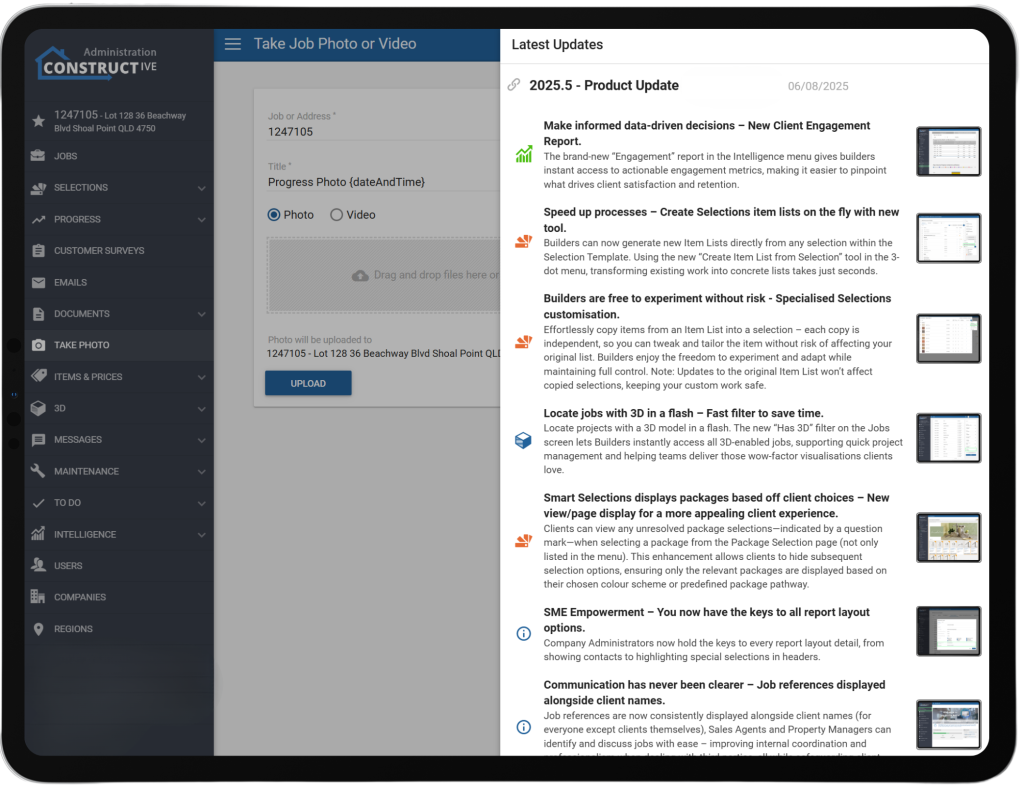
Product update notes are now visible within your Constructive Software.

We’ve added a new Product Updates section to your software, allowing any staff member with admin access to stay easily informed about new features or fixes as they are deployed. A notification indicator (red dot) will prompt users whenever new product updates are available. The product release notes open in a modal window with a summary and link to the full details on our website, making it simple for you to keep up-to-date without interruptions or pop-ups.  

Users – Contract Administrators Can Now Create Jobs.

Permissions have been expanded so that Contract Administrators can now create jobs, not just edit them. This update enhances job management efficiency by reducing dependency on Company Administrators, while aligning with the existing responsibilities of Contract Admins (such as editing jobs and loading selections).
This change enhances the workflow for builders by enabling Contract Admins to handle end-to-end job setup directly, thereby speeding up processes and reducing bottlenecks.**Creating a job generates a charge for a job, as does calculating selections and uploading a model.

Email – Option to Skip Specific Progress Tasks in Update Emails.

We’ve added a new option that lets builders mark certain progress tasks as “Skip Activity”, so they won’t trigger activity records or appear in client/stakeholder update emails.

This feature helps reduce unnecessary notifications (e.g., duplicate milestone reminders) and ensures that only relevant updates are communicated, improving the clarity and efficiency of email communications.

Pricing – Specification and Area Now Visible in Price Table.

The Price Table has been improved by adding ‘Specification’ and ‘Area’ as visible columns. This makes it easier to compare and differentiate between multiple price entries without needing to open each one individually.
This enhancement improves visibility and usability, helping users review and manage pricing more efficiently.

Items – Improved Item Search.

The item search has been enhanced so that results now include items from subcategories under a parent category, making it easier for clients to find what they need.

3D IFC Import – ArchiCAD 27+ Compatibility Fix.

We’ve fixed an issue where IFC models from newer ArchiCAD versions (27+) weren’t importing correctly due to a change in attribute naming.
This enhancement ensures attributes like outside face surfaces are now picked up properly, restoring full compatibility with the latest ArchiCAD versions.

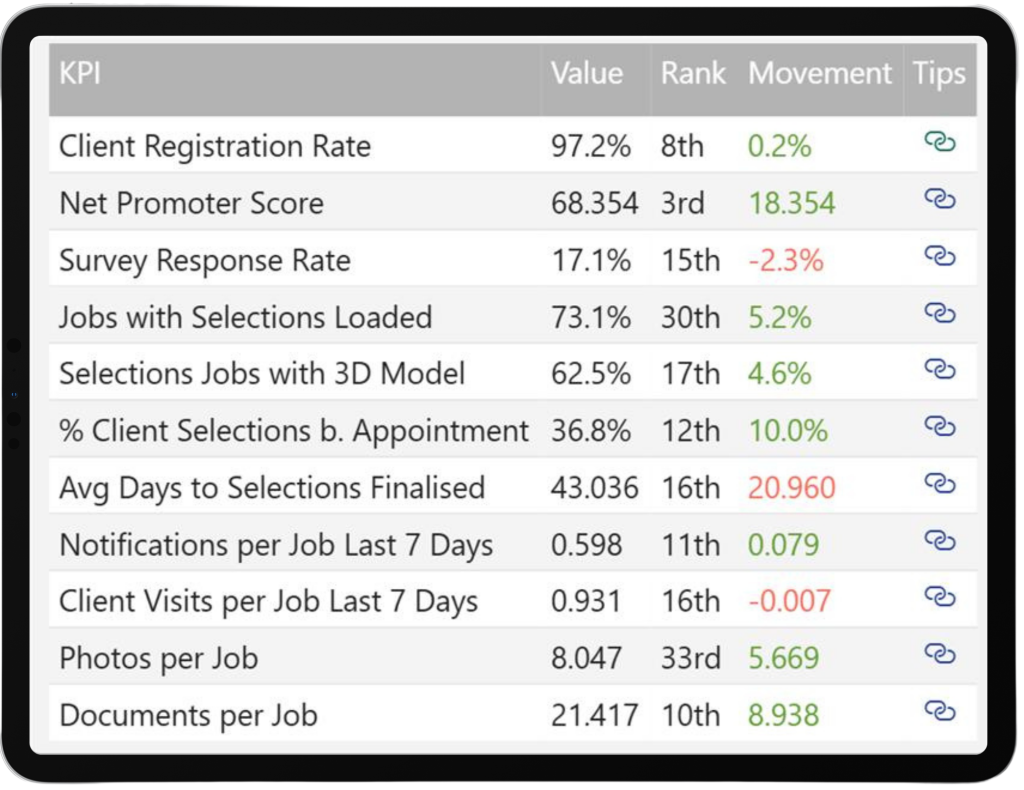
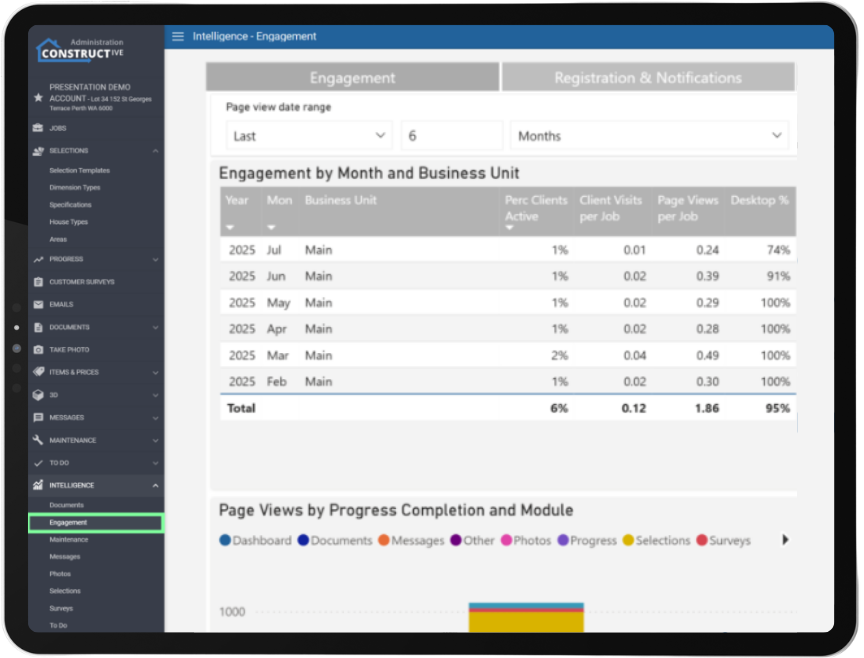
KPIs added to the Engagement report.

See how effectively you are using Constructive with this set of KPIs. Includes your rank compared to all builders using Constructive builders and KPI value tracking over time.

New Jobs Report.

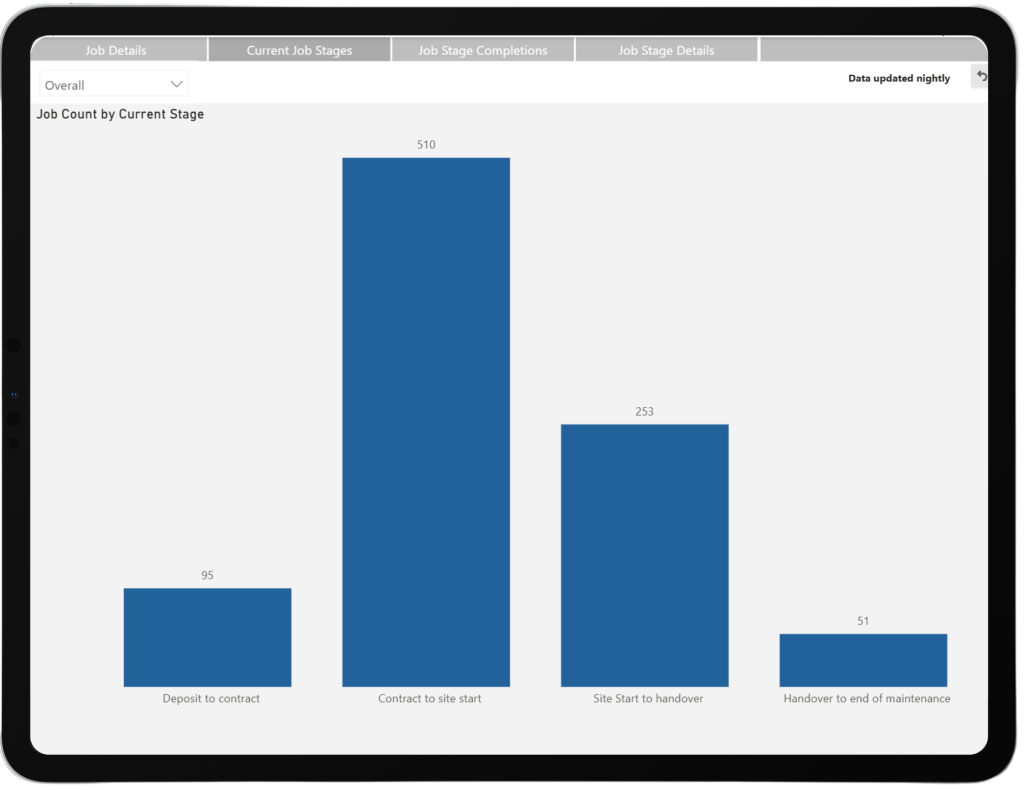
View and export a detailed, filterable list of jobs. Track job progress at scale with Current Job Stages and Job Stage Completions over time.

Selections Log Report.

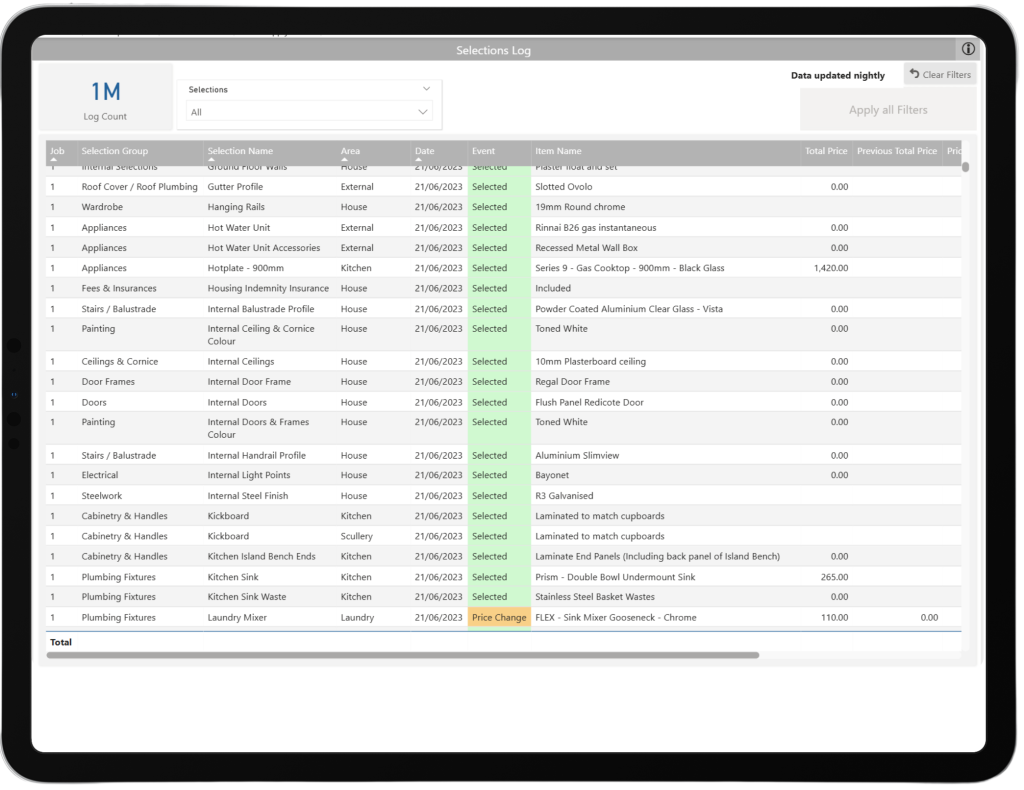
See a log of job selection activity based on daily selections snapshots.


If you have any questions after reading the full release notes, or want help navigating the new features, our team is here to support you.

Delivering excellent customer experience

We integrate with workflow systems

“Double-handling of client and construction data is a thing of the past. Constructive Software seamlessly integrates into key data points of BusinessCraft, enabling us to communicate in real-time to our clients: Documents, photos, Milestones and more.”   

Fabio Fusari, IT Manager – Summit Homes.
More about integrations
Featured Post

Constructive 2025.5 – A wave of useful, innovative gems coming your way!

We bring you an abundance of useful enhancements designed to make your building projects faster, smarter, and more flexible. This release brings streamlined report layouts, instant 3D job filtering, intuitive package selections, clear job referencing, and robust platform stability—plus new dynamic tools for item list creation, and client engagement insights for clever decision making. Experience seamless, personalised workflows and elevated efficiency at every step, ensuring builders and clients alike enjoy the best the online building process has to offer!

Make informed data-driven decisions – New Client Engagement Report.

The brand-new “Engagement” report in the Intelligence menu gives builders instant access to actionable engagement metrics, making it easier to pinpoint what drives client satisfaction and retention. Helpdesk : Constructive Software 


Speed up processes – Create Selections item lists on the fly with new tool.

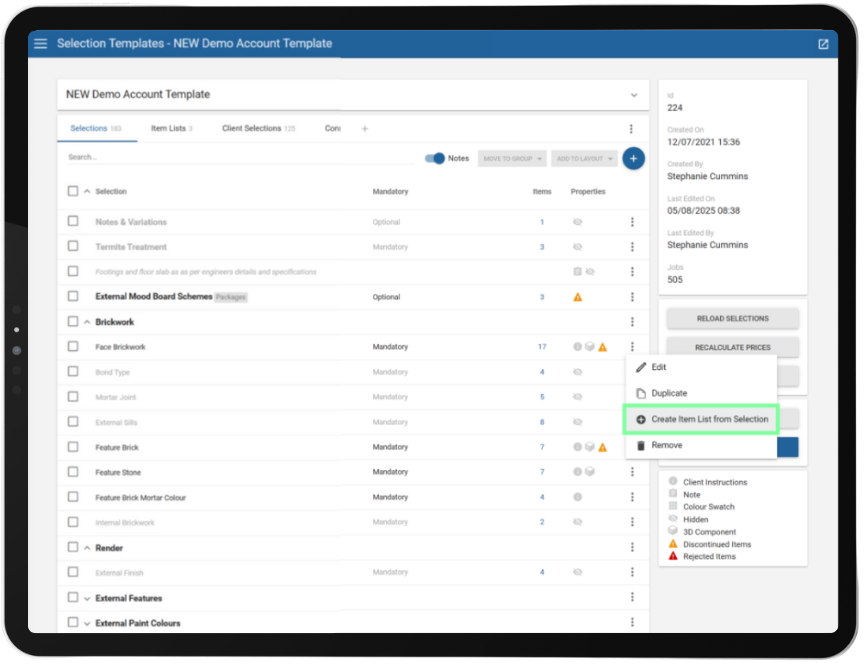
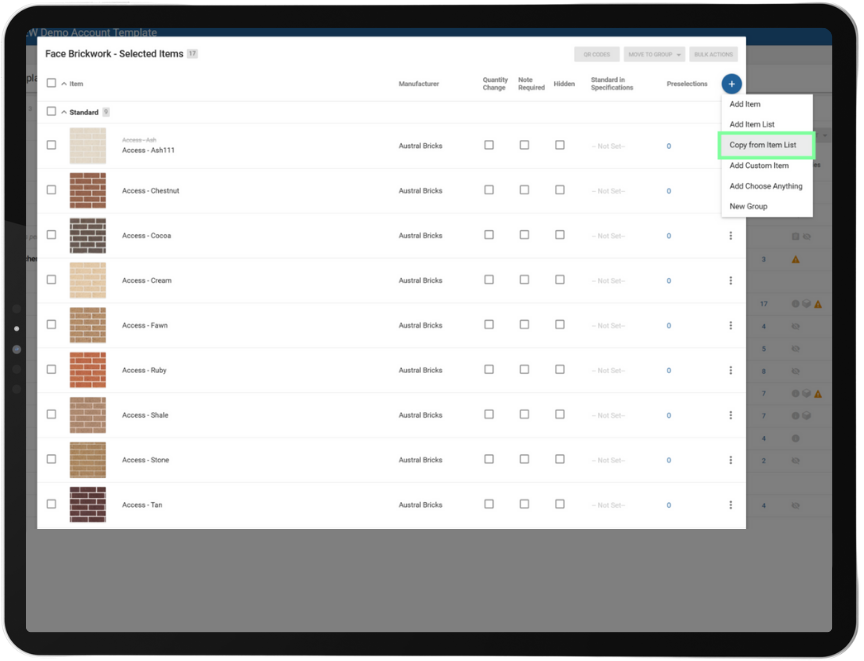
Builders can now generate new Item Lists directly from any selection within the Selection Template. Using the new “Create Item List from Selection” tool in the 3-dot menu, transforming existing work into concrete lists takes just seconds – saving time, reducing admin, and improving the performance of your selection templates through streamlined Item Lists.

How to create Item List direct from a Selection : Constructive Software 


Builders are free to experiment without risk -Specialised Selections customisation.

Effortlessly copy items from an Item List into a selection – each copy is independent, so you can tweak and tailor the item without risk of affecting your original list. Builders enjoy the freedom to experiment and adapt while maintaining full control.
Note: Updates to the original Item List won’t affect copied selections, keeping your custom work safe. How to copy items from Item Lists : Constructive Software 


SME Empowerment – You now have the keys to all report layout options.

Company Administrators now hold the keys to every report layout detail, from showing contacts to highlighting special selections in headers. No waiting on support tickets – just pure, instant configuration power to suit your business workflows.


Locate jobs with 3D in a flash – Fast filter to save time.

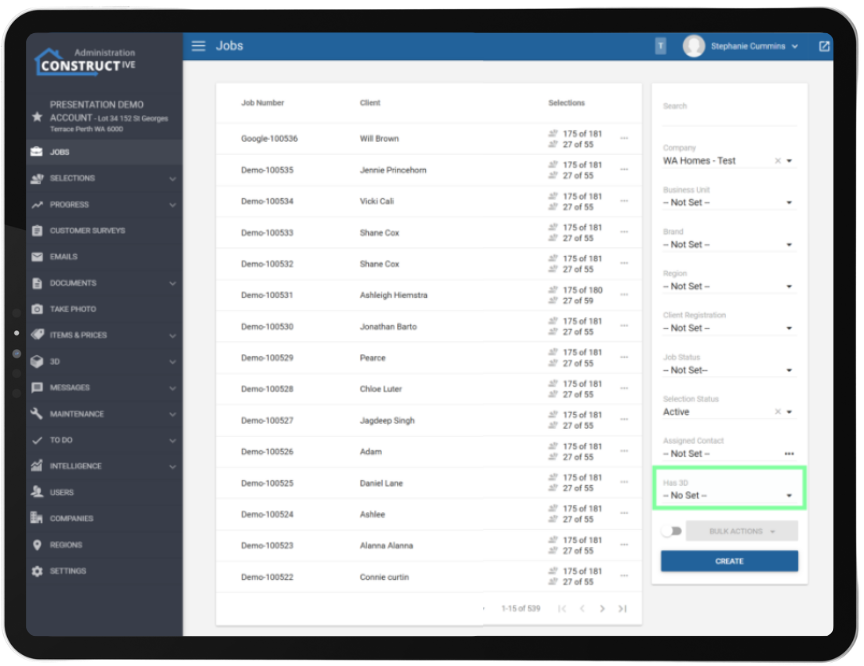
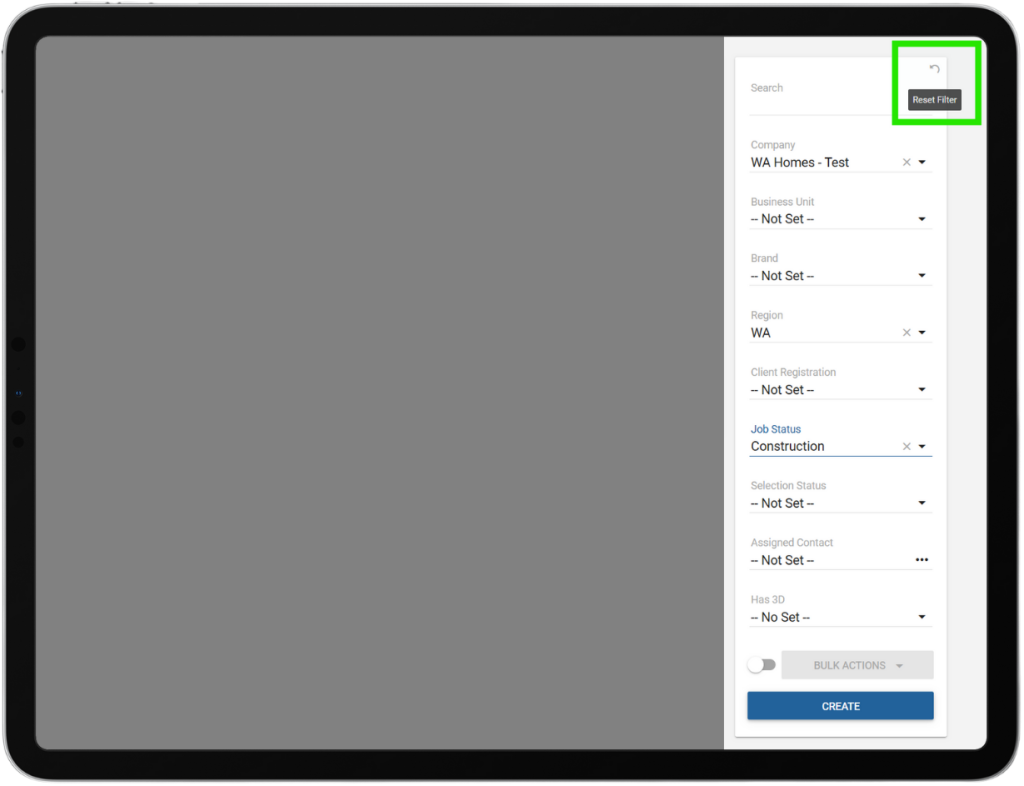
Locate projects with a 3D model in a flash. The new “Has 3D” filter on the Jobs screen lets Builders instantly access all 3D-enabled jobs, supporting quick project management and helping teams deliver those wow-factor visualisations clients love.


Communication has never been clearer – Job references displayed alongside client names.

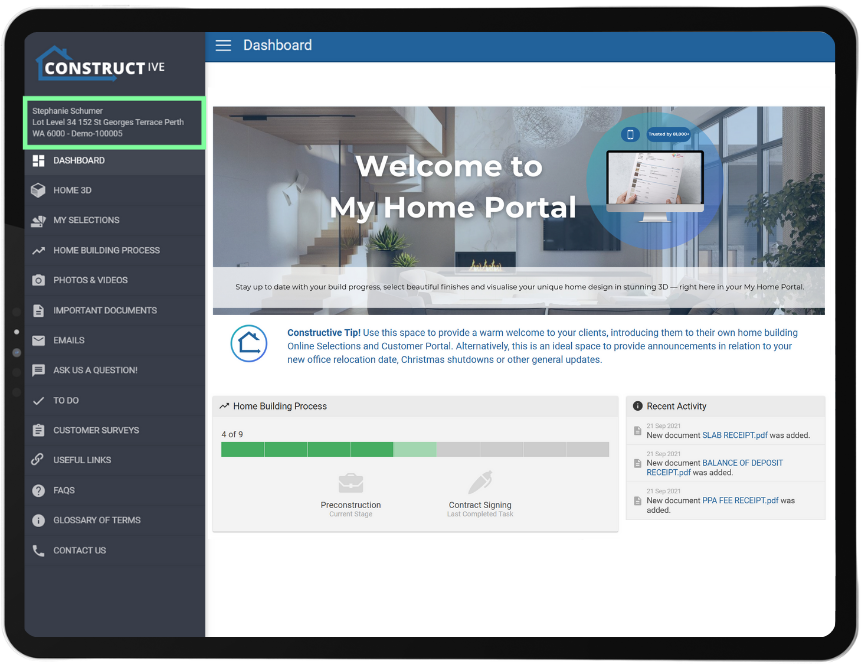
Job references are now consistently displayed alongside client names (for everyone except clients themselves), Sales Agents and Property Managers can identify and discuss jobs with ease – improving internal coordination and professionalism when dealing with third parties, all while safeguarding client privacy.


Smart Selections displays packages based off client choices – New view/page display for a more appealing client experience.

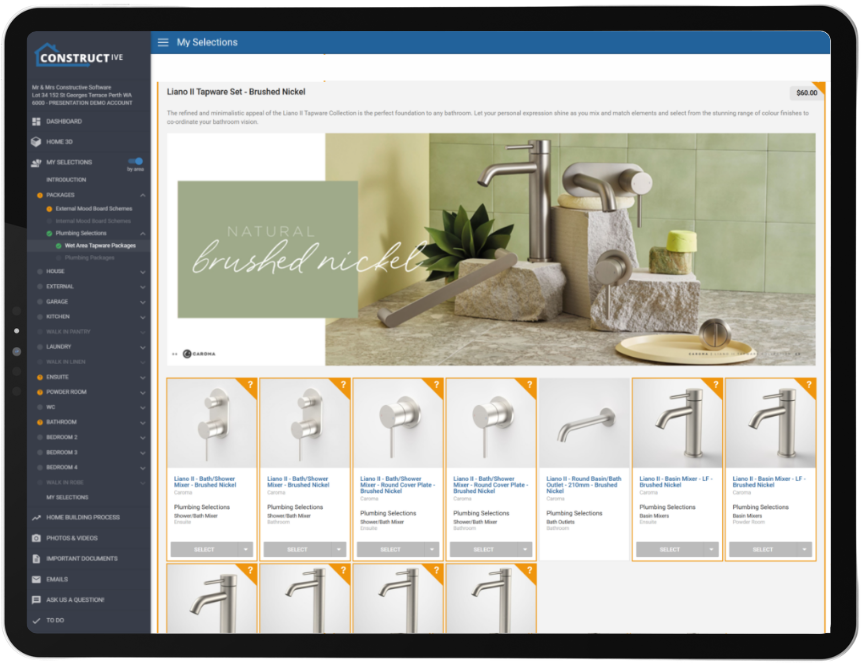
Clients can view any unresolved package selections—indicated by a question mark—when selecting a package from the Package Selection page (not only listed in the menu). This enhancement allows clients to hide subsequent selection options, ensuring only the relevant packages are displayed based on their chosen colour scheme or predefined package pathway.
Note: 3D functionality limits our screen space and therefore the client will need to close 3D to see the full card view to resolve the package choices.


If you have any questions after reading the full release notes, or want help navigating the new features, our team is here to support you.

Delivering excellent customer experience

We integrate with workflow systems

“Double-handling of client and construction data is a thing of the past. Constructive Software seamlessly integrates into key data points of BusinessCraft, enabling us to communicate in real-time to our clients: Documents, photos, Milestones and more.”   

Fabio Fusari, IT Manager – Summit Homes.
More about integrations
Featured Post

Constructive 2025.4 – Experience basins and sinks brought to life in cutting-edge 3D!

Prepare to be amazed as basins and sinks transform before your very eyes! With our latest breakthrough in 3D selection technology, you can now immerse yourself in a vibrant world of choices, with an expansive array of basin and sink models springing to life in stunning 3D detail. Say goodbye to static CAD mockups—clients are now empowered to explore mixers for kitchens, bathrooms, ensuites, and laundries in real time, choosing exactly what fits their vision without ever needing to guess the outcome or see the physical product. This game-changing update streamlines decisions, speeds up selections, and turns design dreams into brilliant, digital reality—all at the click of a button.

Experience it firsthand – Effortlessly customise selections and make confident decisions with unmatched precision.


“When building a new home there is a lot of decisions to be made by our customers, the Constructive Online software allows our customers to make those important decisions like what fittings, style and colours to name a few to choose from the comfort of their homes – online. This software has improved the preparation needed for our staff for when they meet the customer in the prestart meeting.”

Pep Oliveri, Chief Technology Officer – JWH Group


32,000+ people thrive in 3D Online Selections during new home builds – A customer experience enhanced by Constructive’s leading technology.   

“We compared 2 of our builders with a similar brand type, The builder with 3D+ Online Selections has an increase of 46.4% of selections made before appointment in comparison to the Builder who only has Online Selections”

James Salt – CEO – Constructive Software


Performance Enhancements  

Single Sign-On (SSO) Improvements: SSO has been improved with clearer login messages, easier setup for new users, and the option to now include custom details like avatars and phone numbers directly from Entra ID. Builders can now control what user info is visible, and bulk account creation is supported by sourcing contacts from Entra ID and pulling through to Constructive. Bugs were also fixed to make onboarding of Single Sign on smoother. To setup the automatic sync of all relevant Entra ID users please reach out to support (stop manually creating users in Constructive).  

User Management & Access Control: User management has been improved by automatically removing users from cancelled or resigned jobs (when the setting option for remove user on cancelled job is set to yes), ensuring user accounts are not auto locked when linked to a cancelled or resigned deal.

Enhanced Secondary Emails: Secondary emails are better handled to ensure clients receive important updates (excluding registration and password resets). Email support or your CSM to discuss upgrading your integration to pull through secondary emails from your source system). 

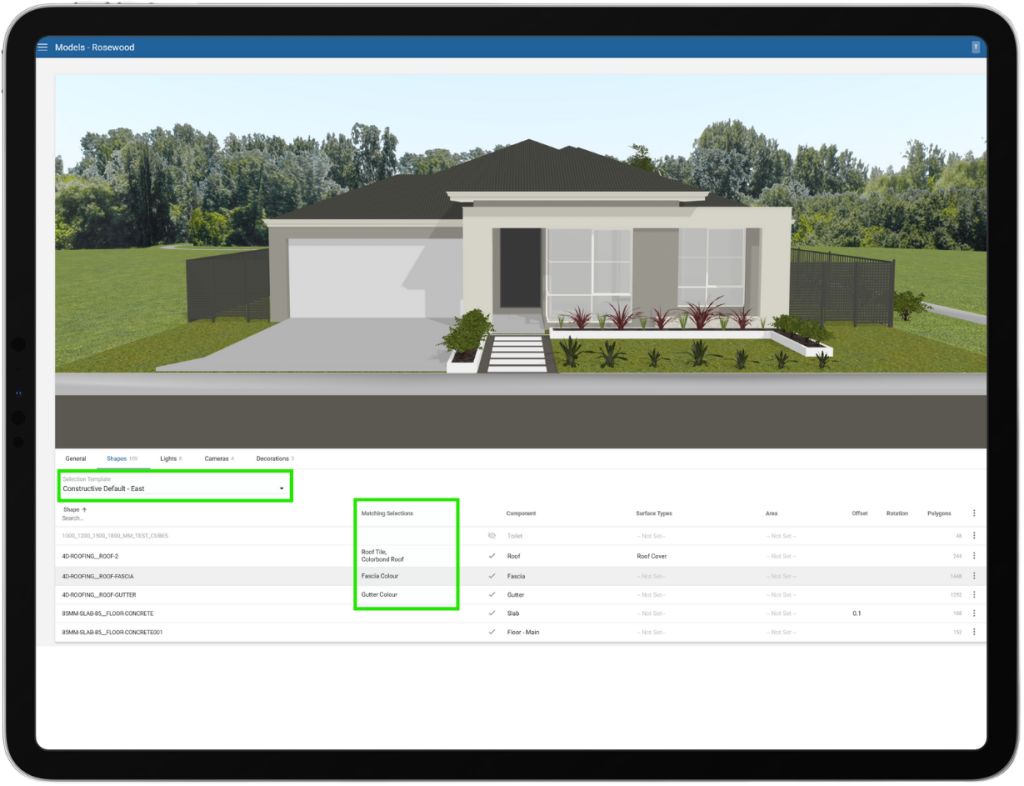
More Accurate 3D Model Displays: We have resolved an issue where internal 3D models, such as kitchens or interior rooms, could not be shown unless an external model (like a house facade) was also present. Now, clients can view detailed internal models even if an external model hasn’t been applied, ensuring a smoother and more accurate design review experience. 

Product and Item Management: We have addressed an issue where Subject Matter Experts (SMEs) were not receiving email notifications when items in their assigned lists were discontinued. With this update, SMEs will now receive timely alerts whenever an item they manage is marked as discontinued. This ensures key stakeholders are promptly informed, reducing the risk of outdated selections remaining active and eliminating the need for manual follow-up. 

Intelligence Reporting: Continuing the migration of reports to be directly inside Constructive, we’ve added Document upload metrics to assist you with managing customer experience and digital engagement. We’ve also added the most important Selections report – Discontinued items so that you can see what discontinued products have been selected across your jobs, filtering to stage of build and/or manufacturer to help you manage your supply chain before it becomes a problem onsite. 

Client View Photos: We’ve now added the ability to put banner text on the photos page, to help with education of the clients. Talk to support to help you set this up.  

Branding: We have enhanced the client view to show a custom Favicon in the browser window. Please talk to support about setting this up.  

General Fixes and System Testing: Numerous refinements across user management, notifications, and system behaviours were implemented along with comprehensive testing of all updates to ensure stability and reliability for the 2025.4 software release. 


If you have any questions after reading the full release notes, or want help navigating the new features, our team is here to support you.

Delivering excellent customer experience

We integrate with workflow systems

“Double-handling of client and construction data is a thing of the past. Constructive Software seamlessly integrates into key data points of BusinessCraft, enabling us to communicate in real-time to our clients: Documents, photos, Milestones and more.”   

Fabio Fusari, IT Manager – Summit Homes.
More about integrations
Featured Post

Constructive 2025.3 – Stunning new feature Kitchen/Bathroom mixers in sophisticated 3D

See the tap/mixer change in front of your eyes. We bring you the latest advancements in 3D selection technology, as clients will now have access to a diverse range of mixer models displayed in vivid detail in 3D. They are no longer restricted to viewing the default mixer model derived from the CAD designs prepared by draftees. This innovative feature allows clients to make more precise choices about mixers for their Kitchen, Bathroom, Ensuite, Laundry, and beyond—all without ever needing to see the physical product speeding up the decision-making process.

See it for yourself – Effortlessly customisable & empowering decisions with precision

“32,000+ people thrive in 3D Online Selections during new home builds – A customer experience enhanced by Constructive’s leading technology.”

James Salt – CEO – Constructive Software

No more guesswork. Clients can now visualise their fittings instantly, experimenting with colour and material combinations to create harmony in the kitchen and wet areas. This technology helps clients make decisions with confidence and precision – turning their dreams into digital reality.

“It used to be so hard to show our clients where colours were going on their visuals — most couldn’t visualise it. 3D Selections is a great visual aid, giving clients a better customer experience!”

ABN GROUP

Your Design Toolkit is About to Become Even More Powerful: Adjustable Sinks & Basins Coming Soon…

We’re getting ready to further elevate clients design capabilities with the highly anticipated next deployment of changeable 3D objects. The upcoming rollout will introduce dynamically adjustable sinks and basins, marking a new benchmark in the world of 3D modelling and object customisation.
Stay tuned -more innovation is coming your way soon!

Selection Report: Now Accelerated  

To make the Selections embedded report faster, with sharpened accuracy and enhanced reliability the following changes have been made:

  • ‘Selection Count’ in ‘Top Selected Items’ and ‘Top Selected Groups’ now counts every selected item, even selections for the same item in an area. Previously ‘Selection Count’ was a distinct count of the item per job and area.

  • The ‘Selection Log’ page has been removed due to its very large size; this will make the ‘Selections Report’ faster with enhanced reliability. ‘Selection Log’ will be available in the next release as a stand-alone report.

If you have any questions after reading the full release notes, or want help navigating the new features, our team is here to support you.

Delivering excellent customer experience

We integrate with workflow systems

“Double-handling of client and construction data is a thing of the past. Constructive Software seamlessly integrates into key data points of BusinessCraft, enabling us to communicate in real-time to our clients: Documents, photos, Milestones and more.”   

Fabio Fusari, IT Manager – Summit Homes.
More about integrations
Featured Post