
Product Updates

Intelligence 2.1 — Engagement Page Enhancements, Registrations and Notifications Engagement Sub-Page, Further Retail Reference Prices

1. Engagement Page Enhancements

We’ve released several enhancements to the Engagement page to help you monitor engagement over time, as well as views and time in Modules:

  • Engagement by Month table
  • Page Views by Module and Minutes in Module per Job
  • New Registrations & Notifications sub-page
    This new sub-page now houses Registration-related visuals. There are also three new data points included:
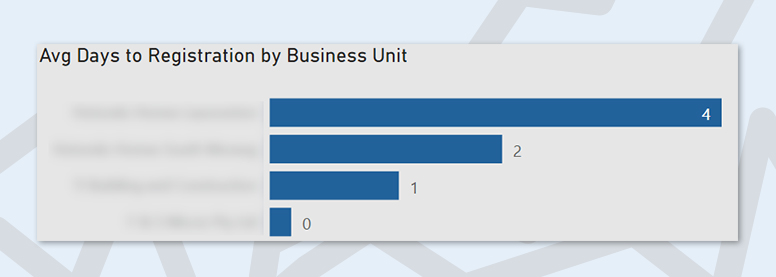
average days to registration by business unit

Average Days to Registration — See how long it takes on average for clients to register and use this to work towards improving speed of client registration.

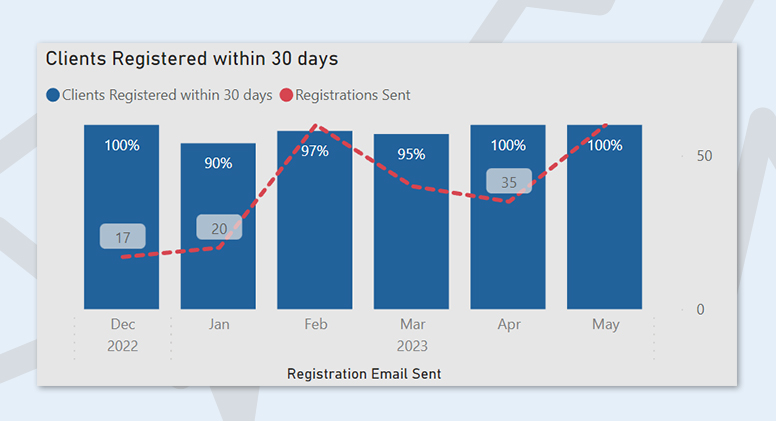
clients registered within 30 days

Clients Registered Within 30 Days — Monitor how many clients register within a 30-day period.

Average Days Since Last Notification — Use this to ensure clients are being updated on a regular basis.


2. Price Configuration, Selection Price Reference

Retail price references have now been added from suppliers, Winnings and Reece.


3. Minor Updates

  • Switch between Brand and Business Unit in by Brand visuals throughout the report via the new buttons.
  • Added Days Since Last Notification column to the Job Details table.
  • Added Sales Agent to Job Details.
Featured Post

Constructive 5.27 — New Client Emails, Additional Report Filters for Client and Builder Notes

1. NEW Client Emails Card

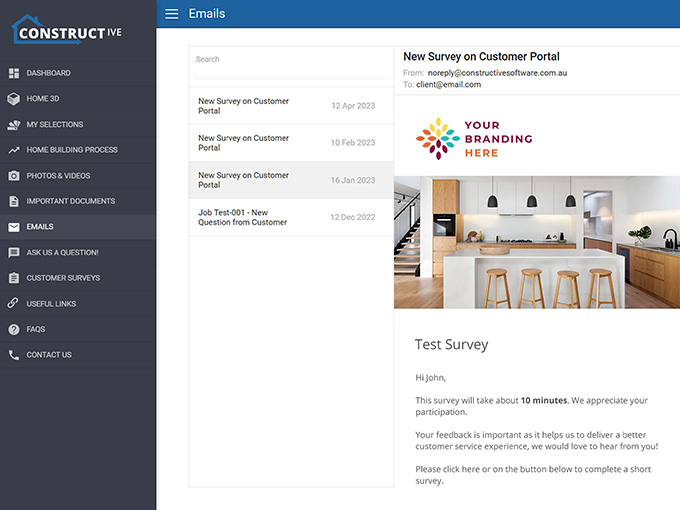
The new Client Emails card displays to your clients all emails on their job sent to them from the Portal. This will enhance your customer experience through transparent communication, digitally collating all email communications a client has received in one place — no more searching through inboxes and folders to find a past email.

Emails are displayed in a chronologically descending list and detail the subject, date and who the email was sent to, along with the contents of the email.

Please note:

  1. Client Emails are turned off by default. If you’d like to utilise this new feature, please contact your CSM to turn Client Emails on in Settings.
  2. Only emails with the following successful statuses will appear in the list: SentProcessedDeliveredOpened
  3. Client Emails won’t show email sending statuses to your clients.


2. Selections Reports – Additional filters for Client and Builder Notes

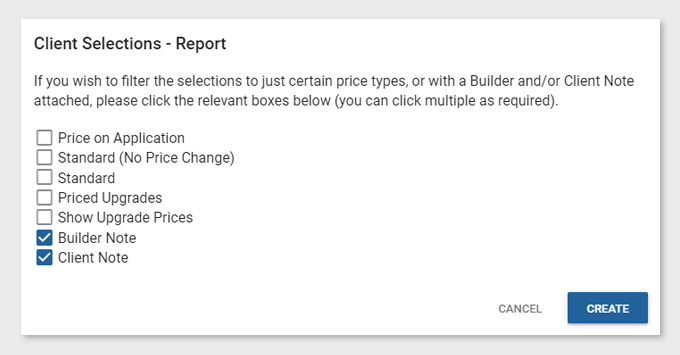
There are two new checkbox filters available in the existing Selections Reports. You can now choose to include any choice that has a Note attached, helping you further curate bespoke, purpose-customised reports.

Please note:

  1. Client and Builder Notes report checkbox filters are selected on by default. For example, if you wish to exclude items with Client Notes attached, please unselect the checkbox before creating your report.
  2. You can select one, or both, Client Note and/or Builder Note.


3. Selections Reports — Mood Board Format combines same item within the same selection group

If the same item has been selected multiple times in the same selection group, it will now combine into one entry, creating a more succinct and organised Mood Board Report.

Featured Post
Constructive Update 5.26

Constructive 5.26 — New Selections Tab, Bulk Changes, View by Area and View by Layout

1. NEW Selections Tab

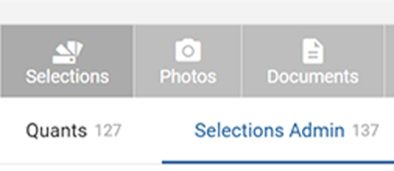
Within the Jobs card, the Selections tab is now its own main category within the grey-coloured section located at the top of the screen, (previously in the Job Details tab). It displays the same selections details as previous.

selections tab


2. NEW Bulk Changes, View by Area and View by Layout

You asked – we listened! The new Selections Admin tab has been created to maximise efficiencies to make your work faster, easier and less complicated while setting up jobs for your clients.

Please view the following video for a summary of this new tab and the new bulk changes updates.

Note: The Client Selections tab shown in the video has since been renamed to Selections Admin.

selections admin tab

Selections Admin tab You’ll now rarely need to go into Client View as you can select items, add builder notes, bulk override prices and bulk hide choices — all directly within the new Selections Admin tab.

Bulk changes Make changes in bulk all at once. Select all within a group, or multiple individual choices and click the Bulk Actions button at the top right of the screen. You can now also bulk hide and bulk show choices for clients.

Change the view by Area Work through selections in an Area as required.

Change the view by Layouts As per the same views as set up in your Reports, for example, Client Selections, Addenda, Painter or Construction Schedule.

Live selections editing There is no need to hit ‘Save.’ Constructive will auto-save your changes as you go along, similar to auto-save when in Client View.

Quants in the same screen For changes to quants as you go, you can easily navigate to the Quants tab within the same screen. Note you will still need to Save and Reload Selections when making changes to quants to ensure everything is up-to-date.

If you have any questions about these changes, please contact your CSM.


3. Bug fixes

  • Reload Selections now correctly automatically deletes items.
  • Progress emails are no longer sent when updated as complete regardless of completion date.
  • You are now able to select child job after switching between parent jobs.
  • You can now create new users with an existing username.
Featured Post
Constructive Update 5.25

Constructive 5.25 — CC Email Setting

1. NEW CC Email Address Setting

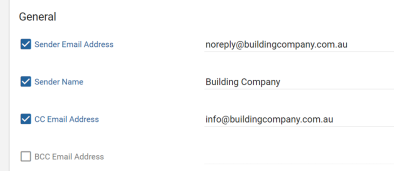
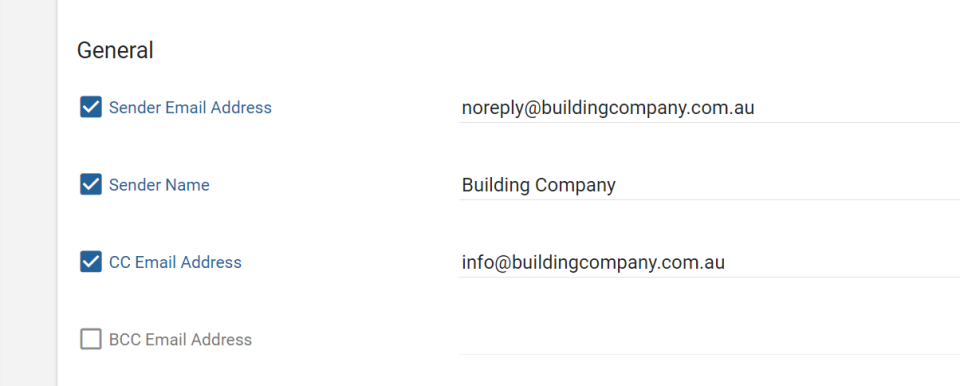
You now have the ability to CC all emails to a global email address, helpful for systems infrastructure that requires CC, rather than BCC.

You can find this new option under Settings, General above the existing BCC Email Address.

Please note, you can only CC or BCC, not both.

cc email address


2. Bug Fixes

Users are no longer incorrectly auto-locked when linked to cancelled jobs
If a user was linked to both cancelled and uncancelled jobs, (and the setting had been turned on to auto-lock users linked to cancelled jobs), they were still being locked, despite having a live job. This is now fixed.

Duplicating housetype no longer includes deleted areas
Deleted housetype areas are now no longer incorrectly copied over when a house type is duplicated.

.obj Model processing scaling of UVs
New model processing texture scaling issues fixed.

Featured Post
Constructive Intelligence Analytics Update 2.0

Intelligence 2.0 — New Selections Log, Selections Price Reference, New Variation Cost Page

1. NEW Selections Log

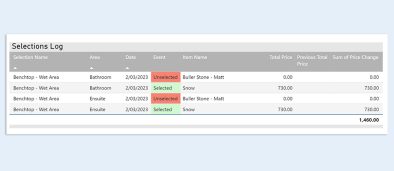
Selections Log, a new feature of Intelligence 2.0, displays a log of selected, unselected and price change events, allowing you to monitor exactly what clients are selecting and changing their minds about.

Please note:

  1. The log is based on selections history snapshotted each night, so details of selection changes within a day are not available.
  2. For unselected events, Selections Made By is not available.


2. Selections Price Reference

An addition to the Price Configuration page, this new table allows you to see your selection template choice prices and assess them against both your standard in-spec pricing as well as an average retail price.

Here’s how you can get the most out of the Selections Price Reference table:

  1. Filter by a single Specification to show the Relative Price — which is the choice price relative to the standard in-spec item price.
  2. The Reference Price column shows the average retail price across the supplier retail price data Constructive has acquired.
    Please note: Currently, retail price data is via supplier The Blue Space. We will be adding more suppliers in the coming months.
  3. Use the Price Reference button to show item choices where a retail price reference is available or use the Price Above Reference button to show item choices where the Relative Price is above the average Reference Price. Drill through to see the details of the reference prices.


3. NEW Variation Cost Page

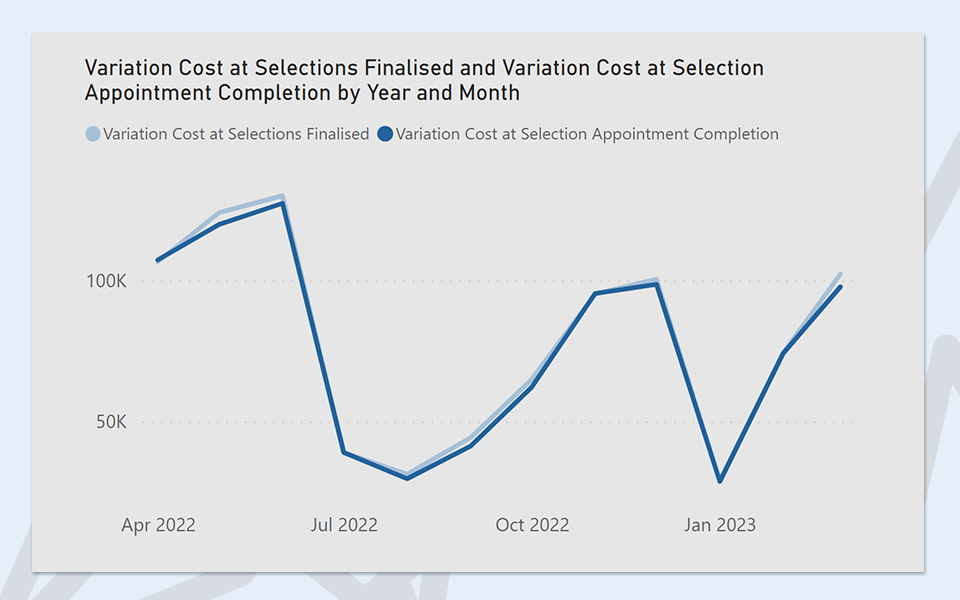
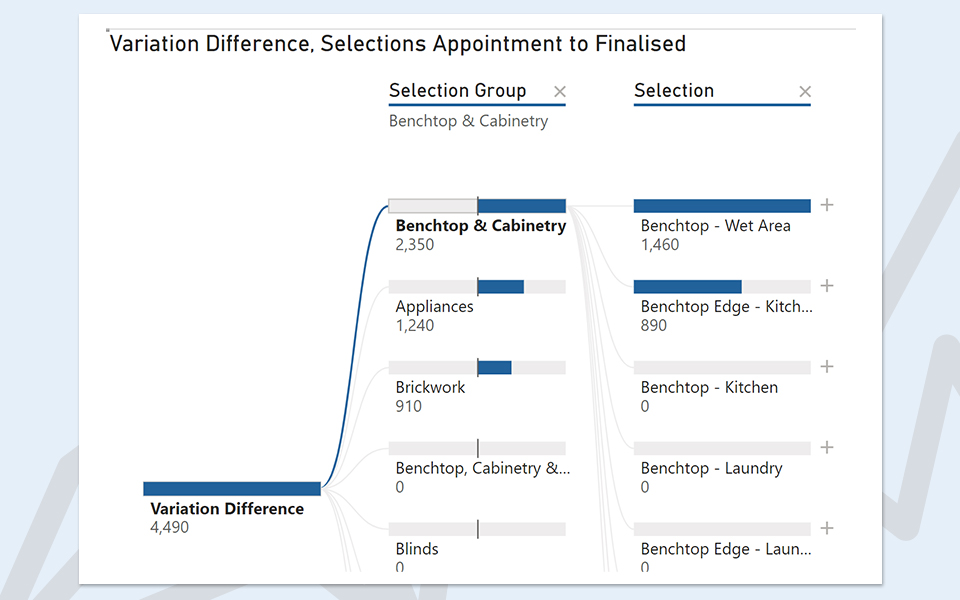
The new Variation Cost page gives you deeper visibility into variations so you can analyse and review the differences from various business units, brands, jobs, selections and items — as well as identify when variations occur after the Selections Appointment, helping you recognise where you can create efficiencies, increase upgrade income and improve processes.

  • Analyse the variation cost across jobs.
  • See the difference in variation cost from Selections Appointment Complete to Selections Finalised.
  • Break down the variation cost difference by Business Unit, Brand, Selection, Item and Job.
  • Drill-through to a log of selection changes (snapshotted nightly).

Please note, variation difference analysis requires the following progress tasks completed on jobs:

  1. Selections Appointment completed. Dates are taken from the progress task matching the name in Constructive Settings: Selections: Prestart Meeting Progress Item Name.
  2. Selections Finalised. Completed dates are taken from manually identified progress tasks, usually named “Final Documents” or “Final Plans.” If you believe the incorrect progress task has been used, please contact your CSM.

    variation cost selections finalised
    variation difference


4. Navigation Changes

  • Top Choice Groups page is now a button on Top Item Choices page.
  • Top Items by Upgrade Price and Top Selection Groups by Upgrade % pages moved to visuals on the Selection Upgrades page.
  • Price Overrides page is now a button on Price Configuration page.


5. Minor Changes

  • Added new counts to the Photos page showing the count of Construction jobs that have no photos added in 30 days, 90 days and 180 days.
  • Added Last Photo Added On column to Job Details table.
  • Added option to show Photos by Client Liaison.
  • Added Client Email column to Selection Detail table.
Featured Post
Constructive Update 5.24

Constructive 5.24 — 3D Improvements

1. 3D – Speed improvements

We have improved frame rate and initial loading performance, translating into a substantially smoother, faster experience for your clients making selections in 3D, (via an approximate 80% decrease in transferred and download resources, and a 52% decrease in GPU draw calls).


2. NEW Internal 3D – Optional wider lens view for internal cameras

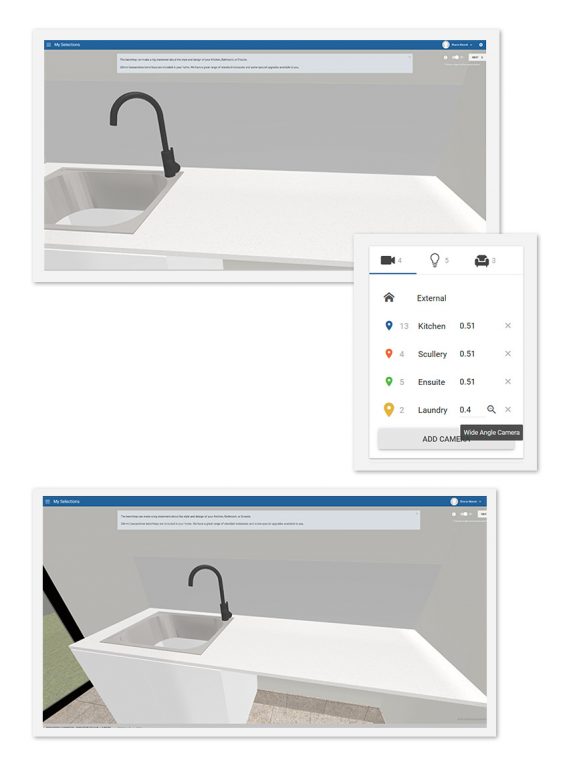
Previously, smaller rooms — such as a laundry, or ensuite — were difficult to view in full when visualising Selections in 3D. You now have the option of increasing the field of view of internal cameras to show more of the room and help your clients gain a better visual understanding of the space.

Once you have set up your cameras, simply click the magnifying glass to activate the wider lens view.

wider angle lens internal 3d


3. NEW 3D – Auto-correction of house model rotation during IFC processing

Often, loaded IFC models may be pre-rotated in 3D programs, such as Archicad or Revit, to mimic block direction.

Constructive 3D will now automatically retrieve the angle and apply rotation to your model to face true North, reducing common Internal and External 3D rotation issues, such as incorrect floor tile direction.

IFC model rotation


4. Internal 3D – Model Mapping – Add Area to Model Mapping Template

You can now add an Area to your Model Mapping Template within Internal 3D. Please contact your Client Success Manager for set up and training.


5. Bug Fixes

3D – Model Edit – Missing roof visibility correction
If your 3D model has loaded with part of the roof missing, you now have the ability to fix this in the Model Edit screen.

Please ensure the roof is mapped to the correct dimension type of ColorbondColorbond Roof or Roof Tiles as per your Selection Template. Once the dimension type is added, click on the three-dot kebab menu on the missing item and select Fix missing roof parts.

Featured Post
Constructive Intelligence Analytics 1.9

Intelligence 1.9 — New Online Engagement KPI: Percentage of Client Selections before Appointment

1. NEW Percentage of Client Selections before Appointment

Intelligence 1.9 features a new Online Engagement KPI showing you the percentage of the client visible Selections that were selected by a client up to one day before the Selections Appointment Completion date. This is averaged across jobs which have completed their Selections Appointment.

With this data, you can benchmark your results and strive to increase your percentage to reduce the amount of time spent in the Selections appointment and speed up the pre-Construction process.

Percentage of Client Selections before Appointment is now available on the Online Engagement KPIs page, with history from 3 February, 2023.

percentage client selections prior to appointment


2. Other Updates

  • Percentage of Client Selections before Appointment added to the Metrics for active jobs on the Engagement page.
  • Percentage of Client Selections before Appointment added to Job Details.
  • 180 day historical rank added to Online Engagement KPIs page.
  • Added a drill-through from Documents per job by Client Liaison to Job Document Details.
  • Selections by Month page now shows the last two years by default.
Featured Post
Constructive Intelligence Analytics Update 1.8

Intelligence 1.8 — Selections Timeframes

Intelligence 1.8 features a new Selections Timeframes page, providing you with data to benchmark and monitor your completions over time so you can look at ways to speed up your clients’ journeys to completing Selections and assess Selections Consultant performance.


1. NEW Selections Timeframes

The new Selections Timeframes page tracks the counts of Selections Appointment completions over time and the number of days until Selections are finalised. 

Please note: To display meaningful data on the Selections Timeframes page, you must have Progress implemented and maintained on jobs in Constructive, including completion dates for Selections Appointment and Selections Finalised Final Documents Final Plans tasks.

View the Selections Appointment Count by Finalised Timeframe: Same Day, or within 15, 30, 60 and 90 day time-frames. You can also drill-through to Job Details.

selections appointment count

Intelligence can help you monitor Selections Consultant performance. View the Average Days to Selections Finalised by Selections Consultant, and over time.

average days to selections finalised
selections not finalised


2. Other Updates

  • Online Engagement KPIs Added Average Day to Selections Finalised KPI.
  • Engagement page The Active Client count is now a monthly display, showing the last 6 months, (previously daily, showing the last 30 days).
  • Job Details new columns Selections Available to Client OnSelections First Locked OnSelections Finalised On and Days to Selections Finalised.
  • Documents page You can now switch between Documents per Job by Contract and by Client Liaison.
  • Surveys Surveys with non responses rate will now show on the Response Rate by Survey Name chart.
  • Discontinued Item Selections table Added a new Manufacturer column.
  • Selection Details Added a new Product Code filter.
Featured Post