Product Updates

Constructive Update 4.6.2

Constructive 4.6.2 – Item Improvements

Features: Selection Item Improvements

1. Price indicator in 3D view
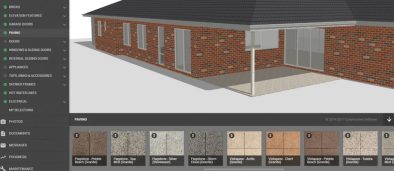
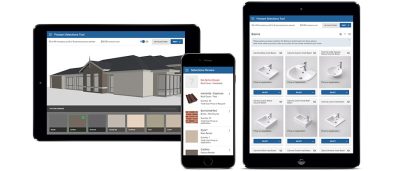
We’ve enhanced the 3D selections view to include a small price indicator so the clients can see those items that are non-standard, but still maintain the same space for the 3D view.


2. Item View Improvements
We’ve gone through and optimised the view of the items in all areas of Constructive.

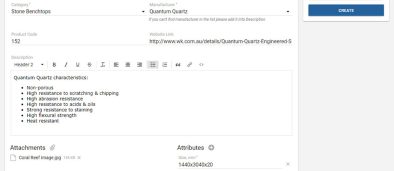
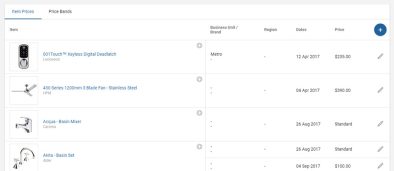
  • Display manufacturer in all areas of Constructive Online Selections. Making it much easier to identify the correct item, whilst making the name more meaningful
  • New Subtitle available on items to help add clauses to items that are not strictly their name
  • Product codes are now available on the Selected Items report. This enables a more useful report for production estimating and construction departments.


3. Item Search Improvements
We’ve enhanced the item search screen to search all aspects of the item (not just the name). This will allow searching for range names, finishes and product codes.


4. Item Naming Conventions
We’re working hard on maintaining and improving our item library for your use. To this end, we are standardising the item names to take advantage of range/collection and other information. We’ve been working hard on this and you’ll already see massive improvements in lots of categories. This is continual work!

As we recognise some item names might not be suitable for everyone we have included the ability to override the name in the selection template.

Featured Post
Constructive Update 4.6

Constructive 4.6 – Selections Editing

Features: Selections Setup & Items Usage

1. Selection Template Edit Screen
We’ve rebuilt the Selections edit screen from the ground up the to achieve two main objectives:

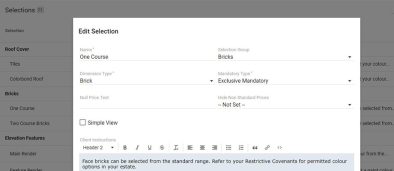
  • Selection Name and Group editing
  • Make searching the massive item library easier

On an individual selection you can now rename or move it between different selection groups yourself. You are also able to switch between detailed and colour swatch (simple) mode straight within the edit screen.

Adding items to the available items list is now a lot easier. Hit the + button in the items screen and then use the text search, manufacturer and category filter. On the list see the manufacturer name to ensure you can tell the difference between all of those Woodland Greys!

When editing the selection template there are now two buttons:

  • Recalculate selections – this triggers a recalculation of all selections for this template where the selections are not locked (post selections meeting),
  • Recalculate Sell Prices – this recalculates the prices only for all jobs where the selections are not locked. Both of these buttons are very useful for pushing urgent changes through to all active jobs.


2. Item Usage Reports
We’ve enhanced the newly provided items screen so that it now shows you which selections templates use an item. This is great for managing you supplier agreements and ensuring all templates get updated.

Featured Post
Constructive Product Update 4.5.1

Constructive 4.5.1 – Customer Messaging

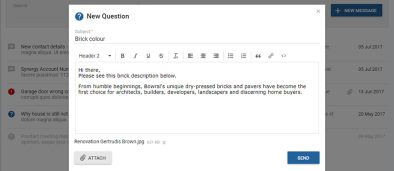
We’ve greatly enhanced customer messaging, allowing the client to register questions, issues or notes at their convenience. All whilst your setting the expectations of response times and process. Thus enabling the client to interact with your business at any time, but within the customer portal not in open social media.

Acting to monitor responses, different message types have a status of unresolved or resolved. Thus allowing you the builder to track response times and the number of items to action, split by customer service agent.

Email alerts of outstanding items so your customer service agents never drop the ball.

To turn this feature on just configure who the recipients would be for each contract status (with an email fall back) and away you go.

Featured Post
Constructive Product Update 4.4.2

Constructive 4.4.2 – Items Library Search Screen

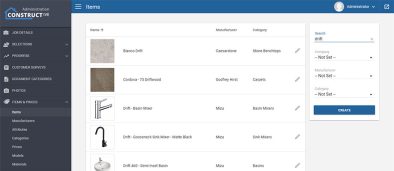
Brand new Item library search screen

Added a much requested screen allowing you to search through the item library. Filter by manufacturer, category or search using the text search field. This enables you to find those items that you want to include in your selections.

You can click on the manufacturer or the category of any of the items to add this to your filter. We’ve made the items library easy to navigate. Clicking on one of the items (anywhere other than Manufacturer or Category names) pops up a detail tab for that item where you will see additional detail like photos, file attachments and descriptions. We’ll be adding other information and links in the not too distant future.

Featured Post
Constructive Product Update 4.3.1

Constructive 4.3.1 – Portal Look and Feel

1. Portal Look and Feel
Revisited all portal pages, providing a consistent navigation and look and feel across the whole customer portal. This continues our ever improving customer offering. Including a major revamp of the underlying technology which optimises the application for mobile devices (reducing size by 40% and increasing speed significantly).

2. New Single and Projects Progress Page
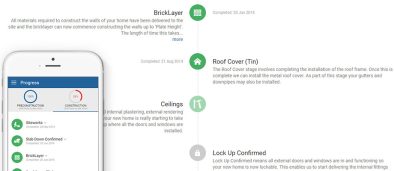
Revisited the progress pages with special emphasis on the ease on mobile devices. We also now allow selection of icons against the different tasks displayed. Please see the improved progress item edit screen in the Progress Templates setting. These icons will also be used on the dashboard for the last completed task.

3. 3D Auto processing of CAD models
Automatic upload of the CAD models for 3D visualisation each time the working drawings are updated. No extra effort or cost from your drafting team.

4. Small Enhancements

  • Additional Construction Area Manager role for uploading photos against any job (not limited to assigned as Supervisor)
  • Massive update to texture library
  • Auto reminder for selections to be made prior to selections meeting
  • Significant optimisation of the application size (reducing by 40%)
  • Include selections meeting in survey request url, allowing more context aware surveys
Featured Post
constructive software product update 4.3.0

Constructive 4.0 – Selections UI Improvements

1. Brand New Menu System
Improvements to menu layout, ensuring as much space as possible to the important details of visualisation and selections. The new menu now combines everything and shows on the left hand side.

Please note that the all navigation menus are now in the left hand column, apart from the user account and logout options which stay in the top right of the screen. As an admin user the ‘COG’ to move to the admin screen is in the top right corner, as this is more consistent with the admin pages (move to client application).

2. Mobile Device Usability Improvements
As over 42% of the users are on mobile devices, we’ve re-looked at the user interface, and really optimised it for the mobile devices. You’ll find the interactions are a lot more intuitive for the user. The new menu system greatly assists this, with more consistency across the platforms.

3. Brand New Standard Selection Screen
We want to showcase the possible selections to the client as best as we can. So we’ve concentrated on the images, and we show more options per page.

4. 3D Selections Lighting
We’re continuing our improvements to the 3D visualisations, by enhancing the light levels and displaying a more realistic view via shadows (on those devices that can handle it). With the menu improvements we’ve also given the 3D view more space. It is also now simpler to move between the visualisation and standard view mode via the toggle button.

You can now also use the mouse scroll to move the visible items.

5. Colour Swatch Upgrades
Colour swatch view now shows a lot more colours, and you can drill to the detail of the name by tapping on the colour. This means we can show many more colour selections.

6. Detail Page Layout Changes
In the selection detail page, we’ve improved the layout, as well as making it easier to zoom into images on all devices (including mobile)

7. Review/My Selections Mobile Optimisations
Continuing our mobile improvements, the Review/My Selections page we’re greatly improved.

8. Speed
With all of these beautiful improvements also comes with some under the hood tinkering that makes the user interface even quicker. You’ll see improvements flow on from all this hard work in the not too distant future.

9. HTTPS support
Automatic redirection to https for custom domain names with ssl certificates.

Featured Post